Into Depth – Large Array of Things

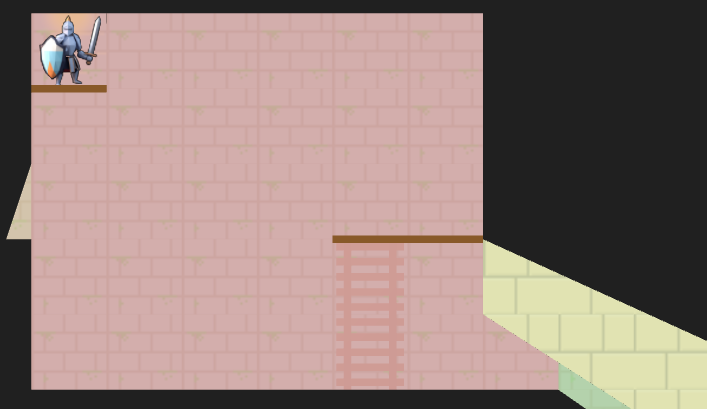
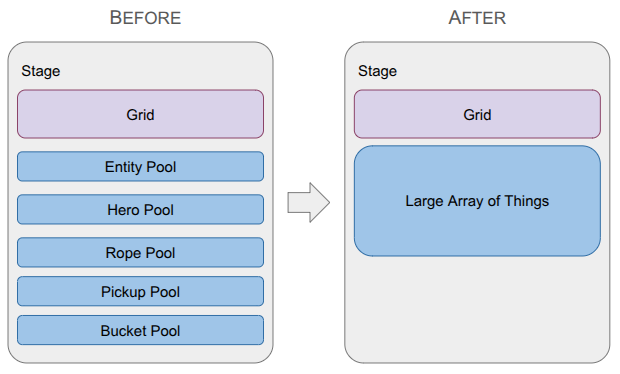
A depiction of the change in the data structure used to represent game entities, going from type-specific lists with a top-level entity table to a single large array of things.

Last month was a big overhaul of the underlying grid representation in order to be able to handle portals. This month ended up being another major refactor, but instead of the grid, I overhauled how game entities are stored.

I wanted to get Pickups back into the game in order to get the fundamental game loop: Heroes enter levels, gather Pickups, and exit to unlock items that make them more powerful. Once Pickups were working, I wanted to add other core mechanics like ropes (for climbing) and buckets (which hold Pickups and can be hoisted via ropes).

All of this logic made it very clear that my current way of interacting with entities was too cumbersome. I had a top-level Entity type that could be looked up by any entity’s ID, and then would itself contain a type enum and a type-specific ID in order to look up the specialized data in the type-specific list. That looked something like:

// Grab the hero.
const Entity* entity = Get(stage.pool_entity, entity_id);
ASSERT(entity != nullptr && entity.type == EntityType::HERO);
Hero* hero = GetMutable(stage.pool_hero, entity.type_id);

After this change, there is no indirection. All entities are in a single array:

// Grab the hero.
const StageThing* thing = Get(stage.things, entity_id);
ASSERT(thing.type == EntityType::HERO);
// Now we can directly access `thing.hero` and do stuff.

Making the transition to a Large Array of Things' data structure removed this annoying indirection. More importantly, it simplified how concepts are shared across entities (e.g., all StageThings now have a cell index). That shared context streamlined my event system - an AttachTo event no longer needs special logic for buckets vs. ropes vs. heroes – and drastically simplified my undo/redo system.

With this new architecture, I was finally able to implement some basic gameplay:

This video shows the state of the game at the time of writing. We see the rope being equipped before entering a basic level. The knight then deploys the rope, which the sorceress can then use to climb down, pick up a relic, and then climb back out. Graphics and UI are very rough first passes.

The rest of this post will cover why I used the original approach, what the Large Array of Things is, and how it led to these improvements.

Old Method: Type-Specific Lists

I started with type-specific lists for every entity type in my game, following what I understood was Billy Basso’s approach on Animal Well. Every entity type gets a struct, and we maintain an array of each struct type that has some max capacity, and we keep the array densely packed as entities are added or removed:
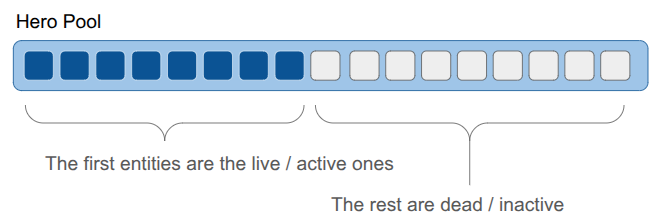
Keeping the live entities packed in the front makes iteration over the entities really fast. We only need to iterate over the first N elements, and they are all sequential in memory.

However, keeping the entities packed means that if an entity is deleted, we will move other entities around:
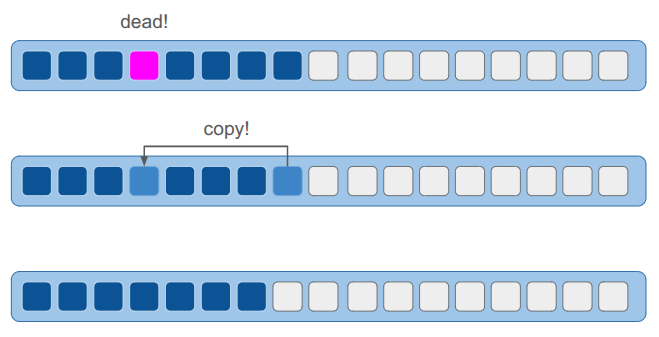
The result is that we can’t reliably point to an entity with a pointer, since its location in memory can change. To solve this, each ObjectPool maintained an extra layer of indirection. Each entity was referred to by an ID, which indexed into a lookup table to find the struct’s actual array index. All of this was managed internally by the pool, so the user never had to track it. I didn’t find this problematic at all.

At the beginning of game development, I was iterating through my lists of types quite a lot. Rendering was effectively:

for (hero in heroes) {
    RenderHero(hero)
end
for (rope in ropes) {
    RenderRope(rope)
end
// etc.

That approach was fine before I introduced portals. Now, the same tile might show up in multiple places on the screen. I was no longer able to just loop through the entities to render them; the entities themselves didn’t know where their cells were located in the final view. The iteration had to go the other way:

for (x in view.lo.x to view.hi.x) {
    for (y in view.lo.y to view.hi.y) {
        cell = grid.cells[x][y]
        for (entity in cell) {
            RenderEntityAt(entity, x, y)
        }
    }
}

With spatial iteration taking over, the primary benefit of densely packed lists completely disappeared. Yet, I was still paying the cost of indirection—which, honestly, was more about code line-count overhead than runtime performance—every single time I accessed an entity.

Old Method: Top-Level Entity List

The type-specific lists were not sufficient when it came to entities referring to other entities. For example, a rope might refer to the entity holding it. Initially, maybe I knew that would always be a hero, and I could use the hero’s pool index. However, if I later wanted to additionally allow tying a rope to, say, a piton, I’d have to use some cumbersome union. The same issue applied to held objects. A hero might hold a rope, a bucket, or a pickup. If I used a union to store the reference, I would have to update that union—and all the branching logic tied to it—every time I added a new type of holdable item to the game. I needed a more general entity reference.
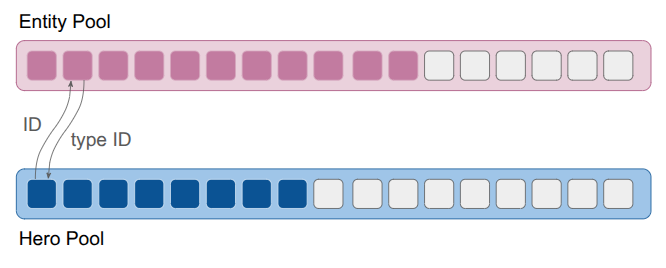
The solution I went with was another list, this time of a generic Entity struct that would contain both the entity’s type enum and its type-specific ID. I also stored additional IDs that let me refer to entities generically, across levels (a feature that was never fully fleshed out). The resulting struct was small, and just enough to support the double-lookup:

struct Entity {
    // The type of entity enum
    EntityType type;
    // The identifier for the entity among all entities in a stage
    EntityId id;
    // The entity's index into the object pool for its type
    EntityId type_id;
    // A globally unique ID for the entity for
    // referring to an entity in the game across all levels.
    // All entities defined for a level have a UID.
    // For other entities (like those spawned temporarily in a stage),
    // this is kInvalidEntityUid.
    EntityUid uid;
};

As discussed earlier, this system required that, given an EntityId, I first look up the Entity struct and then use the entity’s type to identify the type-specific pool and access the type-specific data via the type ID. In addition, actions on entities had to be specialized to each entity type, which made the event system complicated. Finally, I wasn’t taking advantage of the tightly packed object lists, so there wasn’t much keeping me on the current system other than momentum.

Large Array of Things

I also learned about the Large Array of Things from the Wookash podcast, in an episode with Anton Mikhailov. This data structure is basically and array of fat structs – rather than having a different collection for every entity type, you define _one_ struct that all entities, or Things, rather, use. The data structure is extremely simple – just an array of Things:

If we want lists, we can hook Things together using intrusive pointers. Any Thing can “point” to another Thing via its integer index. We get a list by maintaining an external index to the head Thing:
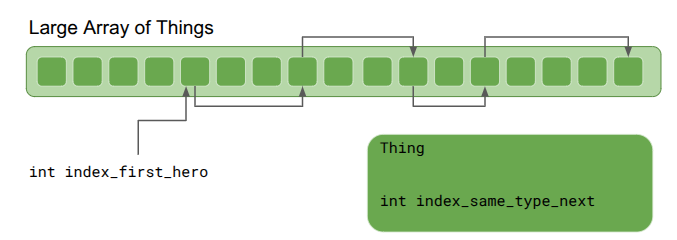
Iteration through the list simply starts with the first Thing and goes until the index is invalid:

int index_next = index_first_hero;
while (index_next != kInvalidThingIndex) {
   Thing& thing = things[index_next];
   DoSomething(thing);
   index_next = thing.index_same_type_next;
}

That works just fine, but we do have to (1) make sure to initialize all things with index_same_type_next = kInvalidThingIndex and (2) if we accidentally use thing.index_same_type_next with a bad index, we could go out-of-bounds. Anton recommended making all such reference lists circular:
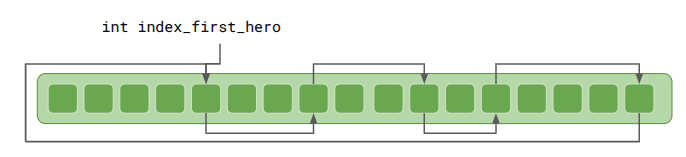
This means thing.index_same_type_next should always be valid. If a Thing is the only one of its type, it will will point to itself.

Iteration is very similar, and has the advantage that one can start from anywhere in the list:

int index_next = index_first_hero;
do {
   Thing& thing = things[index_next];
   DoSomething(thing);
   index_next = thing.index_same_type_next;
} while (index_next != index_first_hero);

In addition to lists, indexing can also be used to represent trees:
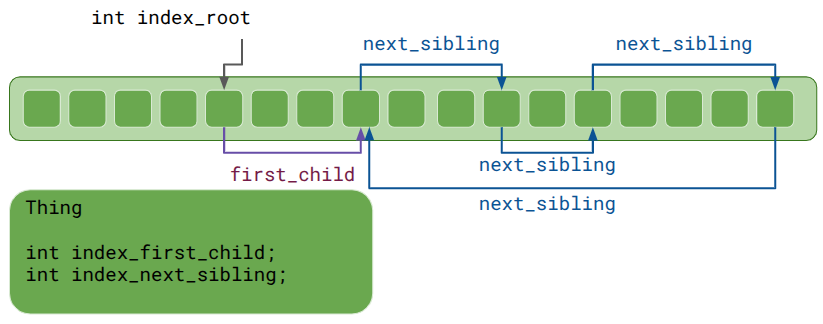
Each Thing has a head index to a list of children, which then reference each other using sibling indices.

It makes less sense here for the head index, index_first_child, to simply point back at the same Thing, since a parent-child relationship is not a circular list. Anton Mikhailov recommended using zero for the invalid index rather than a truly invalid index like -1 in order prevent crashes. Yes, you should never access a Thing at an invalid index, but at least your game doesn’t explode in prod if a rare code path does. Plus, this means zero-initialization defaults those indices to invalid.

As a side effect, the very first Thing is never used. That is a small price to pay, especially if you’re likely going to allocate 10,000.

Lastly, Anton Mikhailov said it is often useful to use doubly-linked lists instead of singly linked lists. This makes insertion and deletion O(1). For trees, it is very useful for a child to know its parent.

So what does a Thing struct look like? Here is my current implementation:

enum class StageThingType : u8 {
    FREE         = 0, // An inactive stage thing
    HERO         = 1, // aka Player Character
    INTERACTABLE = 2,
    ROPE_SEGMENT = 3,
    COUNT        = 4, // Sentinal value
};

// A thing whose state we track in the stage.
// This follows the Large Array of Things approach.
struct StageThing {
    // The type of thing it is.
    StageThingType type;

    // The generational index of the thing in the array of things.
    ThingId id;

    // The index of the next thing of the same type.
    // This is a circular list.
    int index_same_type_next;
    int index_same_type_prev;

    // Which cell in the stage it is in.
    CellIndex cell_index;

    // The index of the next thing in the same cell.
    // This is a circular list.
    int index_same_cell_next;
    int index_same_cell_prev;

    Direction facing_dir;
    // Tree links.
    // Parents and children are always in the same cell index.
    // The sibling list is circular.
    int index_parent;
    int index_first_child;
    int index_next_sibling;
    int index_prev_sibling;

    union {
        StageThingHero hero;
        StageThingInteractable interactable;
        StageThingRopeSegment rope_segment;
    };
};

I went with a union of type-specific structures for now, since it was the most natural conversion of what I was translating from. However, team fat struct may end up convincing me. We’ll see.

We need an additional struct to store the array and the list heads:

struct LargeArrayOfStageThings {
    StageThing things[MAX_NUM_THINGS];
    int count;

    // An array of heads for doubly-linked lists.
    // Index 0 (StageThingType::FREE) is the free list.
    int type_list_heads[(int)StageThingType::COUNT];

    // An array of heads for doubly-linked lists of things in each cell.
    int cell_first_thing[GRID_MAX_X][GRID_MAX_Y];
};

As we can see, the StageThing type zero is for free / inactive Things, letting us use the same list to quickly grab the next available Thing any time we spawn a new one, or stitch it into the list if a Thing is no longer needed. Then there are a bunch of methods that maintain invariants, such as initialization, getting a Thing, attaching a child to a parent, etc.

Indices maintained by the `LargeArrayOfStageThings` itself, such as the linked type list, can be simple integers. Other indices, especially external references, shouldn’t use direct indices since the underlying Thing might be removed in the interim. (This is the same problem as keeping a pointer reference to an Entity.)

The standard mitigation, which I was already employing in my ObjectPools previously, is to use a generational index. Instead of a bare index, it is an index paired with a generation counter:

struct ThingId {
    int index;  // index in the array of things
    u32 gen;    // generation counter
}

Retrieving a Thing via such an ID simply looks at the Thing at the given index, but also checks to make sure the generation counter matches. If it does, we return it. If the Thing has been deleted, or if it has been re-used, the generation counter will have been incremented, and the counter will not match. Since we’re using a u32, there is basically zero risk of wrap around. (Though you can always use u64 if that’s a problem for you.)

Sharing Concepts

Having the shared StageThing struct means we can share concepts across all entity types. The first example is the cell index. Every StageThing can be placed in a cell. This doesn’t mean I have to use it, but so far I am. The direct result is that I can have a single codepath for PlaceInCell, which doesn’t have to have branching logic for heroes vs. ropes vs. enemies, and the LargeArrayOfStageThings can automatically update the internal list of things in each cell.

This drastically simplified my event system. Before this change, the AttachTo event required distinct code paths for every single entity type. Now, attaching is universal for all entities—it is simply a parent/child relationship.

You’ll notice that the StageThingType enum does not contain Pickup or Bucket types. I actually consolidated those into a single type – Interactable. This happened when I started considering how a Pickup could be set down or picked up, but so too could a Bucket. The Bucket simply had additional capabilities, such as allowing other things to be placed in it.

The aha moment here is recognizing that we care about functionalities rather than what a thing is categorically. So, the Interactable has a bitmask that identifies what the thing can do – can it be placed, hung, acquired, used to contain other things, etc? When it comes to the code logic, that is ultimately what it needs to know. Do I or do I not run the logic for this capability?

This is exactly the insight the fat struct folks advocate for. Seeing this simplification, I am seriously tempted to go all-in on the fat struct approach.

The final part of simplification was now recognizing that all entities are contained in at most a single cell. Prior to this, my rope entity spanned multiple cells. I now have a RopeSegment type instead, which is exactly one cell and has links to the RopeSegment it is connected to above or below. This works really well with the centralized cell lists and handles portals seamlessly.

Here we see a rope being lowered through a portal. The sorceress then climbs down it.

Undo and Redo

I want undo and redo to be supported from the get-go, and to “just work”. Every action must be reversible, and after being reversed, we should be able to re-commit it.

In this post, I covered the event system. Any action builds out a schedule of events that then can be played out. I supported undo and redo by collapsing the schedule into just the set of events needed to get the overall state change needed. For example, if a hero moves three times, which are three cell index change events, I could collapse that into just one cell index change event for undo / redo purposes.

Unfortunately, the logic to do this got rather involved. Any new field that I added to my entities might require a new custom event that I would then have to detect and inject. I also had several “larger” events like hoisting a rope up or down that manifested as a multitude of smaller events. Moving a rope up means adjusting all RopeSegments in the chain. I’d then have to iterate over all of those to see if there were diffs, and figure out the right events to add to the undo / redo sets to get the right result. A big headache.

Instead, I shifted from a delta-based approach to a snapshot approach. I implemented a single, special master event that lets me replace an entire StageThing. That’s it. Now, undo / redo entirely consist of these snapshot events, which overwrite the entire struct (plus the pass turn event – that isn’t in the large array of things). Executing an undo or redo simply applies these state-overwrites and then triggers a rebuild of type_list_heads and cell_first_thing in the LargeArrayOfStageThings. Incredibly simple. Since we’re not undoing and redoing all that often, the cost of that rebuild is insignificant.

Conclusion

I’m happy to have this entity refactor behind me, but I also feel like it was a great architectural experience and showed how simplicity can compound. This new foundation feels like a good one to build out from. I plan to start expanding on these core mechanics and perhaps touch up some of those rough first-pass graphics. As always, no promises on specifics! We will let the project dictate how it should evolve next.

Into Depth – Shadow Casting & Portals

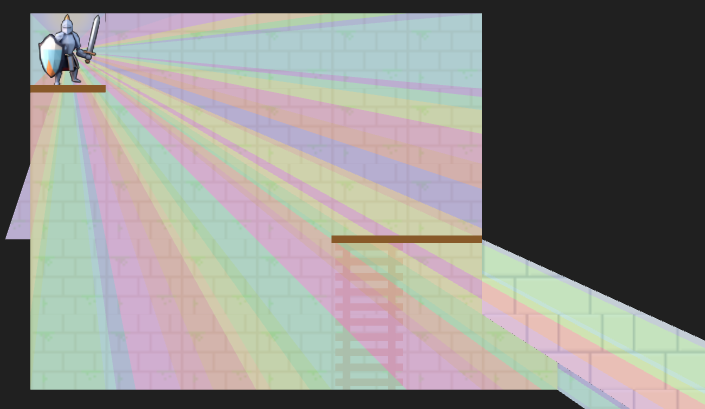
A debug view showing shadow cast segments from the vantage point of the actor.

Last month we covered the unified action system, in which we built some basic things players can do with their heroes, and set the stage for fancier futures and actions for enemy agents. The most significant action was moving, which was built based on a GridView of what the actor sees from their current vantage point. As noted in that post, we eventually wanted to expand the grid view to include edge information, such as thin little walls and platforms, but also portals that act as non-Euclidean connections to other parts of the map.
Here we have a simple two-tile room with a loop-back portal on either end. The result – the hero can see a bunch of versions of themselves!

In the last post, I said I’d be adding other entities in and adding more actions, but I decided that the map representation was so fundamental that prioritizing getting these portals in was more important. Any changes there would affect most other systems, so I wanted to get that done first.

Grid Representation

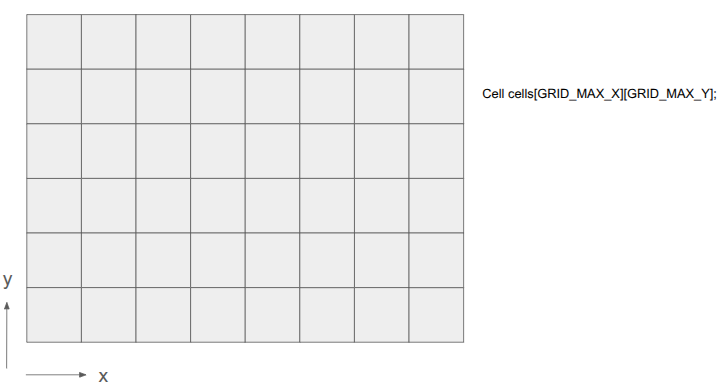
Prior to this change, the underlying level geometry representation, the Grid, was just a 2D array of cells:

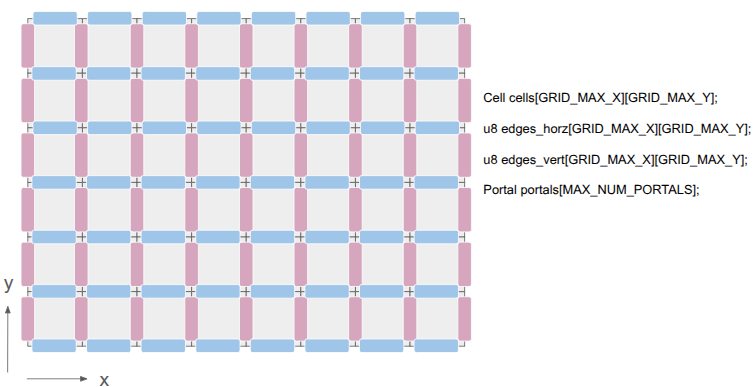
After this change, I wanted to represent both the cells as well as the edges between them:

This was achieved by adding two additional 2D arrays, one for the horizontal edges and one for the vertical edges. There are definitely other ways to do this, but I felt that (1) this was simple, and (2) there are differences between those edge types. A player might stand on a platform but have a door that they can open, for example.

The edges are single-bit entries, to keep things efficient. If we need more information, we can index into a separate array. I’m currently using the first two bits to identify the edge type, and the remaining 6 bits, if the edge is a portal, index into a Portal array. The Portal stores the information necessary to know which two edges it links.

This change has the immediate consequence that getting the cell neighbor in a given direction does not necessarily produce the Euclidean neighbor. Its second consequence is that cells no longer need to be solid or not — the edges between cells can instead be solid. This slightly simplifies cells.

Grid View Representation

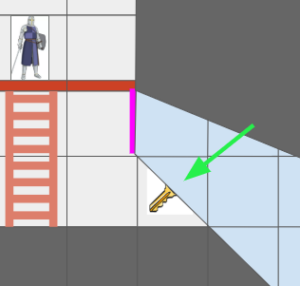
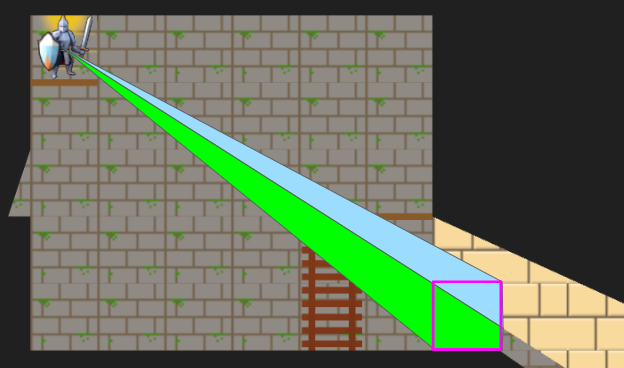
The Grid View, introduced in the last post to represent the level geometry as seen by an actor from their vantage point, can now represent views where the same underlying cell might show up multiple times due to portal connections. Furthermore, we might have weird cases where one square cell might contain slices from different areas of the map:

The green arrow points at a view cell which, due to the portal (magenta), has two sections of different grid cells.

Before, the grid view was a simple 2D array with one cell per tile. Now, that is no longer the case.

The updated grid view is organized around ViewNodes, ShadowSegments, and ViewTransforms:

struct GridView {
    // The grid tile the view is centered on
    CellIndex center;

    // The first ViewNode in each view cell.
    // 0xFFFF if there is no view node in that cell.
    u16 head_node_indices[GRID_VIEW_MAX_X][GRID_VIEW_MAX_Y];

    u16 n_nodes;
    ViewNode nodes[GRID_VIEW_MAX_NODES];

    // Shadowcast sectors.
    u16 n_shadow_segments;
    ShadowSegment shadow_segments[GRID_VIEW_MAX_NODES];

    // The transforms for the view as affected by portals.
    u8 n_view_transforms;
    ViewTransform view_transforms[GRID_VIEW_MAX_TRANSFORMS];
};

Most of the time, a given cell in the grid view will contain a single cell in the underlying grid. However, as we saw above, it might see more than one. Thus, we can look up a linked list of ViewNodes per view cell, with an intrusive index to its child (if any). Each such node knows which underlying grid cell it sees, whether it is connected in each cardinal direction to its neighbor view cells, and what sector of the view it contains:

struct ViewNode {
    CellIndex cell_index;

    // Intrusive data pointer, indexing into the GridView nodes array,
    // to the next view node at the same ViewIndex, if any.
    // 0xFFFF if there is no next view node.
    u16 next_node_index;

    // Whether this view node is continuous with the view node in the
    // given direction.
    // See direction flags.
    u8 connections;

    // The sector this view node represents.
    Sector sector;

    // The stencil id for this view node.
    // Identical to the transform_index + 1.
    u8 stencil_id;
};

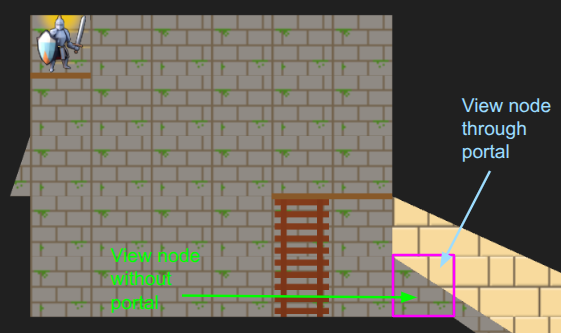
We can now represent cases like the motivating portal scenario:

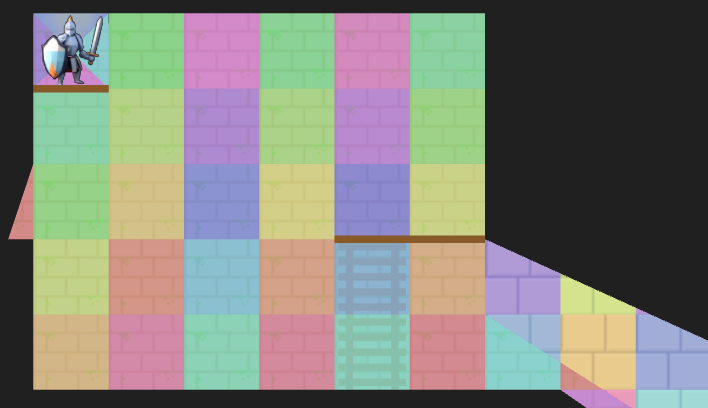
I’ve given the region on the other side of the portal different tile backgrounds to make it more obvious.

In the last post, we constructed the grid view with breadth-first search (BFS) from the center tile. Now, since we’re working with polar segments that strictly expand outwards, we can actually get away with the even simpler depth-first search (DFS). Everything is radial, and the farther out we get, the narrower our beams are:

A debug view showing the final shadow cast segments.

The search logic is a bit more complicated given that we have to narrow down the segment every time we pass through a tile’s edge, we’re saving view nodes in the new intrusive linked list structure, and edge traversals have to check for portals. Solid edges terminate and trigger the saving of a shadow segment.

Portal traversals have the added complexity of changing physically where we are in the underlying grid. If we think of the underlying grid as one big mesh, we effectively have to position the mesh differently when rendering the stuff on the other side of the portal. That information is stored in the ViewTransform, and it is also given its own stencil id.

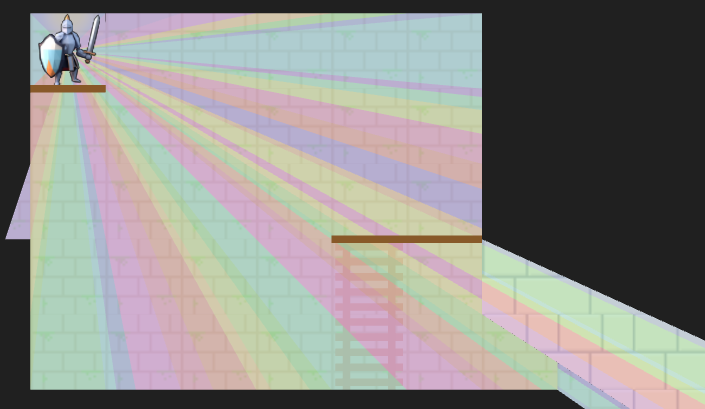
A debug view of the view nodes. We fully see many cells, but some cells we only partially see. The origin is currently split into four views in order for view segments to never exceed 180 degrees.

Above we can see an overlay of the resulting view nodes. There is a little sliver of a cell we can see for a passage off to the left, and there are the two passages, one with a portal, that we can see on the right. The platforms (little brown rectangles) do not block line of sight.

The Stencil Buffer

Now that we have the grid view, how do we render it? It is pretty easy to render a square cell, but do we now have to calculate the part of each cell that intersects with the view segment? We very much want to avoid that!

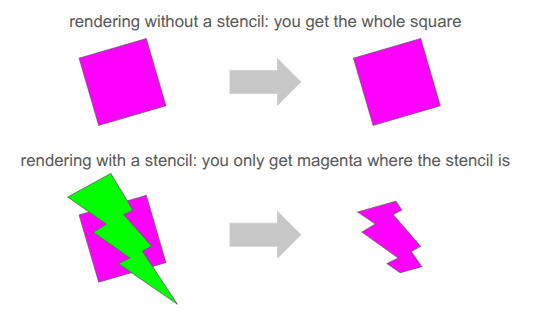
Clean rendering is accomplished via the stencil buffer, which is a feature in graphics programming that lets us mask out arbitrary parts of the screen when rendering:

We’ve already been using several buffers when rendering. We’re writing to the RGB color buffers, and 3D occlusion is handled via the depth buffer. The stencil buffer is just an additional buffer (here, one byte per pixel), that we can use to get a stenciling effect.

At one byte (8 bits) per pixel, the stencil buffer can at first glance only hold 8 overlapping stencil masks at once. However, with our 2D orthographic setup, our stencil masks never overlap. So, we can just write 255 unique values per pixel (reserving 0 for the clear).

We simply write the shadow segments to the stencil buffer, setting the buffer to the appropriate stencil ID:

The stencil buffer has four stencil masks – the red region in the main chamber, the little slice of hallway to the left, the green region through the portal leading back into the same room, and the yellow region through a different portal to an entirely different room.

Our rendering pipeline now needs to support masking with these stencil IDs. In January we covered the render setup, which involved six different types of render commands that the game could send to the backend:

  • render mesh – render a 3D mesh with lighting, already uploaded to the GPU
  • render local mesh – render a 3D mesh without lighting, sending vertices from the CPU
  • render quad – an old simple command to render a quad
  • render sprite – self-explanatory
  • render spritesheet sprite – an old version of render sprite
  • render panel – renders a panel with 9-slice scaling by sending vertices from the CPU
  • render text – renders font glyphs by sending quads from the CPU

Having three versions of everything – rendering without stencils, rendering with stencils, and rendering to the stencil buffer itself, would triple the number of command types. That is too much!

Furthermore, we want to order the render commands such that opaque things are drawn front to back, and transparent things are then drawn back to front, and finally drawing UI elements in order at the end. That would require sorting across command types, which seems really messy.

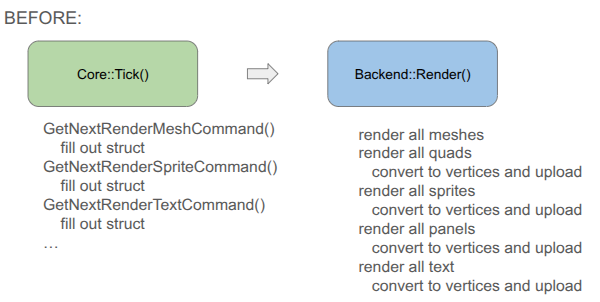
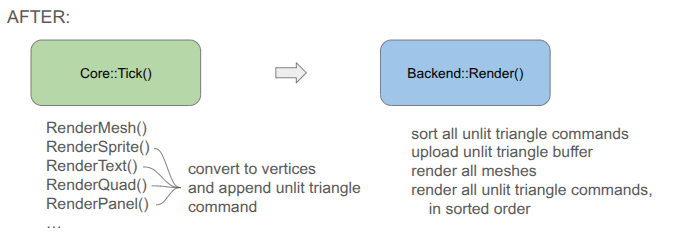
To achieve this all neatly, I collapsed everything sending vertices from the CPU to a unified command type, and have the backend fill the vertex buffer when the game creates the command:

You will notice that the game-side changed a bit. Rather than receiving a command struct and being responsible for populating all fields, I decided to move rendering to methods that expect everything you need to be passed in. This is less error prone, allows for different function signatures that populate what you need, and means I don’t actually need structs for the different command types if we’re directly converting to vertices.

Each unified command (everything but the mesh render calls) is simply:

// Determines the order in which things are rendered.
enum class PassType : u8 {
    OPAQUE = 0,
    TRANSLUCENT = 1,
    UI = 2,
};

// Determines whether and how a command uses a stencil.
enum class StencilRequirement : u8 {
    NONE  = 0, // Does not use stencils
    WRITE = 1, // Writes to the stencil buffer
    READ  = 2, // Reads from the stencil buffer
};

// Determines how the draw gets executed.
enum class DrawMode : u8 {
    ARRAYS,   // No EBO
    ELEMENTS, // With EB
};

struct RenderCommandUnlitTriangle {
    // The commands are sorted by the sort key prior to rendering, determining the order.
    // Bits 63-62 (2 bits): Pass Type (Opaque, Translucent, UI)
    // Bits 61-60 (2 bits): Stencil Requirement
    // Bits 59    (1 bit):  Draw Mode
    // Bits 58-51 (8 bits): Stencil ID (0 for none)
    // Bits 50-32  <reserved>
    // Bits 31-0  (32 bits)
    //   In Opaque:      front-to-back distance
    //   In Translucent: back-to-front distance
    //   In UI:          sequence ID
    u64 sort_key;

    // Draw Arguments
    u32 n_vertices; // Number of vertices to draw
    u32 i_vertex;   // Index of the start vertex
    u32 n_indices;  // Number of indices, if using ELEMENTS
    u32 i_index;    // Index of the start element index, if using ELEMENTS
};

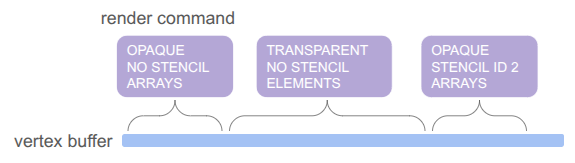
Apparently, this is much closer to how modern game engines structure their render commands. There is one vertex buffer that we write into as commands are added by the game, and the command just keeps track of the appropriate range. The same is true for the index buffer, which in our case is pre-populated buffer for quad rendering (so each quad takes 4 vertices and 6 indices instead of 6 vertices):

The pass type, stencil requirement, and draw mode are then baked into a sort key that we can sort on in order to automagically get the commands in the order we want: opaque < transparent < UI, with no stencil < write to stencil < read from stencil, and then grouping by whether we use the elements (index) buffer or not. We even use the lower 32 bits for additional sorting, rendering opaque things front to back (since lighting is expensive and we can discard more pixels that way), rendering transparent things back to front (required to get correct results), and rendering UI elements in the order they are created.

Being able to call glBufferData once to send all of the vertices up once at the beginning is really nice. Before, we were writing vertices and sending just the few we needed for every command type each time.

The end result is significantly simpler backend rendering code. It can become even simpler if we eventually unify the mesh rendering with the unlit triangle rendering, but I’m holding off on that because those render commands have a bunch of uniform data and then I’m switching between shaders. I’m not currently rendering transparent meshes, and if I eventually do I’ll bite the bullet and further consolidate.

Conclusion

I am quite happy to have tackled the fundamental grid representation, which as we saw ended up affecting a lot of stuff. The new grid view now needs to be properly integrated into the movement action, and then we can actually start introducing other entities like ropes, buckets and relics. No promises on specifics! We’ll let the project dictate how it should evolve.

Into Depth – Unified Triangle Shader

Into Depth is the name of a little game project I have been working on for over a year now. Its roots go back even further, to the 2D platformer I had started working on two years ago. The platformer ended up teaching me a lot about OpenGL, which I have continued to use in a fairly low-level manner in this new project.

Concept art of stone ruins with multiple characters running around.

Concept image by ChatGPT.

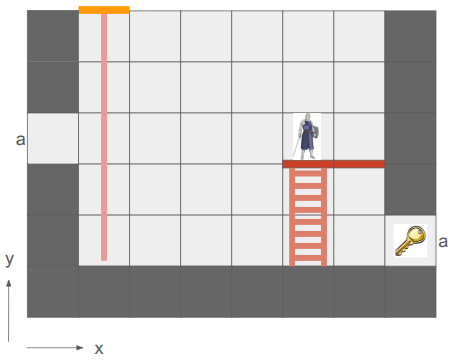
In a nutshell, the game is a simplification of the 2D platformer born both from managing complexity and wanting something I could reasonably make multiplayer and play with my friends online. Into Depth is a turn-based 2D sidescroller on a grid. Kind of like Gloomhaven, but vertical:

A square grid with solid walls, a hero in one tile, a rope extending several tiles down from an entryway in the ceiling, and a key. Two edges are marked 'a'.

An early mockup from my Google slides design doc.

The team of heroes descends into dungeons (e.g., down the rope in the image above) with the goal of retrieving relics. Oftentimes these relics are heavy and require hauling to get them back to the surface. Collected relics can be equipped and used in other levels, and teams may revisit levels in order to get even deeper. That’s the rough idea.

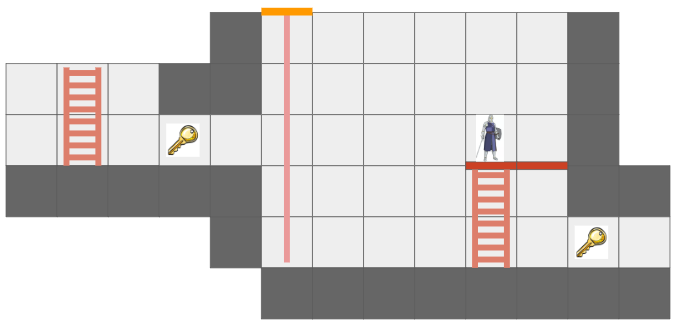
There are additional details, of course. For example, I want non-Euclidean geometry to play a role. In the screen above, the two edges labeled ‘a’ are joined, such that the hero’s view is:

Similar to the previous image, but expanded such that looking through edge 'a' is possible.

The hero can see the key from two different vantage directions because of the portal.

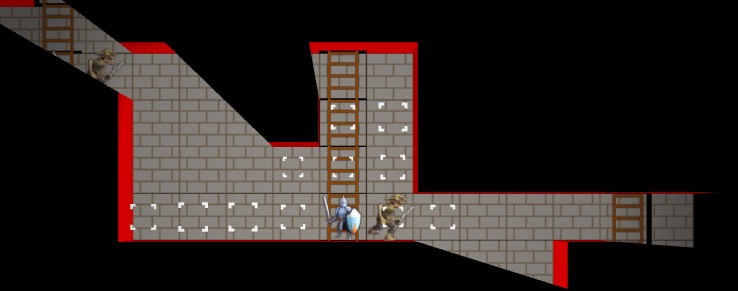
This is made more interesting by having each hero only be able to see what is in their line of sight. Not only does that add an element of discovery and the need to juggle teammates’ perspectives, it also enables stealth mechanics.

An in-game screenshot centered on the hero, with shadow casting blocking things not in sight. An enemy is visible twice due to portal effects.

Solid geometry blocks the view of what is behind it. This image was from before I went orthographic.

I am writing this myself, for fun, in my spare time. My primary goal is to learn how things work, and to actually get something playable for myself and my friends.

I am using C++ and VS Code, on Linux. I try to minimize library use, but leverage SDL2 as my platform library, use GLAD for OpenGL, the GLM types, and several Sean Barrett STB libraries. This includes avoiding the standard libraries, such as std::vector and std::map, and I’m trying to use my own string view s8 as defined by Chris Wellons instead of std::string. I actually haven’t been using ImGui in this project, but I probably will once I have more of an editor.

Why these restrictions? Because I am a big fan of Casey Muratori, Jonathan Blow, and the do-it-yourself attitude of understanding your code. It is a great way to learn how it all works, and it is fun! Presumably it leads to smaller executables and faster code too.

The art you see here is programmer art, since I am a programmer. That is good enough for now. My long-term vision is to have a low-poly aesthetic and mostly not use sprites, since I should be able to author low-poly meshes myself. The scene will be 3D with effects like lighting, but will be rendered in orthographic since that just makes it so much easier to see and work with the grid.

Font Glyphs + Sprites

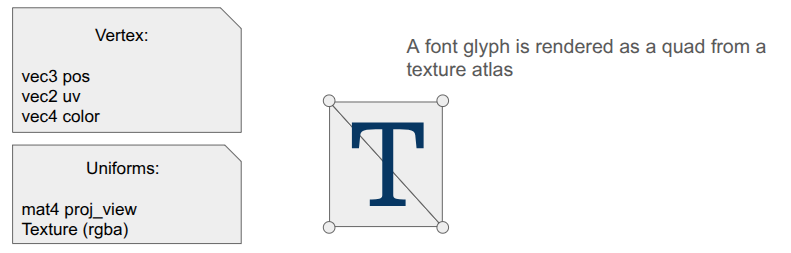
I was most recently working on some basic shaders for the game. I had just added font rendering with its own shader for rendering glyph quads. A UI system typically needs things beyond just font glyphs, like UI panels and sprite icons, and those are mostly just basic quads as well. It seemed obvious that I could share a shader for the dual uses of rendering font quads and rendering sprite quads:

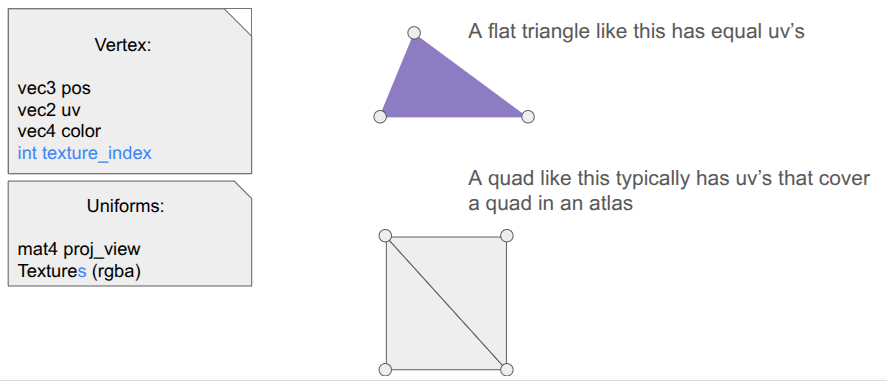
A vertex consisting of pos, uv, and color. Uniforms are a proj_view matrix and a texture. A font glyph is defined as a 2-triangle quad with uv coordinates indexing into an atlas.

The shader is really simple. In the vertex shader, the position is just:

gl_Position = proj_view * vec4(aPosWorld, 1.0);

And then the fragment shader uses the input color as a componentwise multiplier after looking up the texture value via the UV coordinate:

vec4 tex_color = texture(u_texture, uv);
FragColor = color * texture_rgba;

The font atlas has white glyphs, which means this color multiplier produces fonts that look like we want. Colored sprites are typically rendered with color = [1,1,1,1] so that we don’t affect them, but you can also tint them by changing up the values.

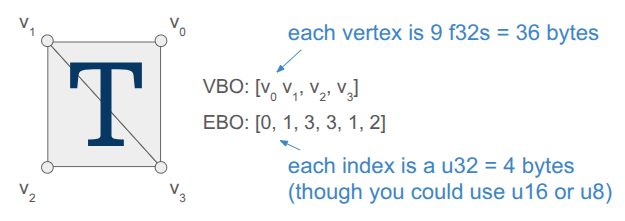
Rendering quads is also straightforward, but when you’re doing it all yourself, there is still a fair amount of stuff to keep track of. Every glyph in the font has a packed quad that tells us its size and its UV coordinates in the font atlas. We write the quad vertices into a VBO, and rather than writing six vertices to get the two triangles per quad, we only write the four unique ones and use an EBO to define the quads by indexing into the vertex array (as is standard practice):

A two-triangle quad showing four vertices in a VBO and six indices in an EBO. This uses 4 vertices * 9 f32s = 4*36 = 144 bytes in the VBO and 6*4 = 24 bytes in the EBO.

Each frame, the backend fills up a vertex buffer and sends it to the VBO for rendering. This only needs to happen once, if the sprites and the font glyphs are all packed into the same texture and everything uses the same projection and view matrix.

Render Commands

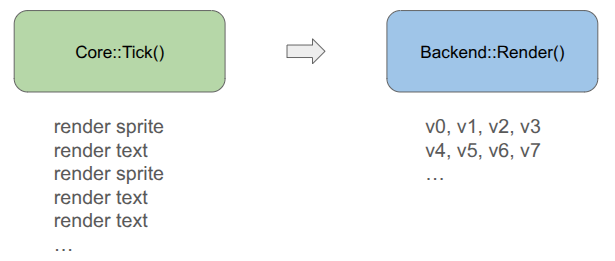
The core game code does not directly fill the vertex buffer. Instead the core game code issues more simple render commands. These commands are simple, higher-level descriptions of what we want rendered, making the core game code fast and separating out the task of deciding how to render everything up to the backend.

A simple flowchart showing Core::Tick() followed by Backend::Render().

For example, a render text command is:

struct RenderCommandTextLine {
    FontHandle font_handle;
    glm::vec2 pos;       // Bottom-left of the first glyph
    f32 letter_size;     // Multiplier off of default
    f32 letter_spacing;  // Multiplier off of default
    s8 text;             // Must last until rendered
    glm::vec4 color;     // RGBA componentwise color multipliers
};

It is up to the backend to convert that higher-level specification into the actual quad vertices, moving that non-trivial logic out of the core game loop and into its own location. The render command thus acts as an API between the game and the backend. Any new backend that we support in the future must be able to render these things.

In the future, when I might have partially transparent objects, the backend can do more sophisticated things like render all opaque geometry first and then sort the transparent objects by depth and render them in a second pass. Something like that is very hard to do when the core logic is rendering as it goes.

Including Triangles

So far, we have a shader that can render both font glyphs and sprites. That’s nice, but I want Into Depth to have a low-poly, flat-color aesthetic. I wanted to add UI panels that underlay the text, and I want those to be tessellated:

A text box backed by a panel consisting of a solid quad surounded by a low-poly border.

A panel like that is comprised of a relatively small number of triangles when compared to a modern 3D character mesh (~40 vs. 1000’s). It should be cheap enough for us to directly write that geometry out every frame.

Our font + sprite shader can actually be used to draw basic triangles, we just need to point all three vertices of the triangle to all-white uv coordinates so that we get the color we want. This is achieved by including a \(1 \times 1\) white sprite.

I thus define some additional render commands, such as RenderCommandPanel, that act as high-level descriptions of what should be rendered, and then have the backend construct the mesh live in the vertex buffer and send it over. Doing this does not use the quad-specific EBO, so for now I’m just using a glDrawArrays call instead of a glDrawElements call.

I did make one adjustment to the shader – rather than switching out the textures depending on my use, I just have an array of textures that I can leave bound and have each vertex declare which one its UV coordinate applies to:

The shader now includes `int texture_index` for each vertex and the uniforms now include an array of textures.

I pack my fonts into a font atlas that is uploaded as the first texture, then have a series of sprite atlases.

Sprite Packing

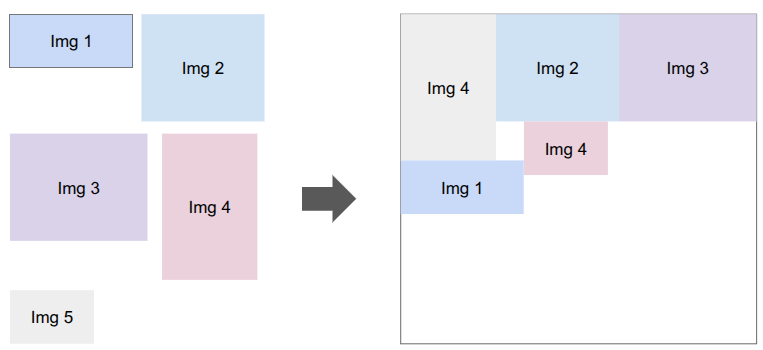
I need to bake my font glyphs and my sprites into a series of textures that my shader can then use. There are plenty of tools that do sprite packing for you. I was already using stb_truetype and stb_rect_pack to create my font atlas, so I decided to write my own sprite packer on top of stb_rect_pack.

A collection of rectangular images on the left are closely packed into a texture on the right.

Conceptually, it is really simple. I give it a set of individual sprites, and it keeps trying to pack as many as possible into a new texture until everything is packed. The only little gotcha is that a \(w \times h\) sprite is packed as a \(w+2 \times h+2\) rectangle in order for it to be padded with a 1-pixel extended border to fight edge bleeding caused by inaccuracies in UV coordinates between mipmap levels.

Shader Code Organization

Beyond assets, shaders themselves tend to more complexity than you’d think because the code to use them ends up spread all over the codebase. The vertex and fragment shader definitions are often two separate .glsl files, which live in their own folder alongside the other shaders. The C++ side typically needs a vertex struct defined somewhere, and then we need both CPU-side vertex buffers and references to the GPU-side shader program IDs, VAO, VBO, and EBOs. Whenever we use a shader, we need to activate it, which involves more code that has to use these references and set various shader uniforms.

I’ve adopted a few enhancements to reduce the degree of code spread.

The first thing I did was unify the vertex and fragment shaders into a single .glsl file. Since we just read in the file and upload it to the GPU before calling glCompileShader, we can actually process out the necessary portions ourselves. Writing both shaders in the same file helps keep their interdependencies consistent.

#version 330 core

#ifdef VERTEX_SHADER

layout (location = 0) in vec3 aPosWorld;
layout (location = 1) in vec4 aVertexColor; // rgba
layout (location = 2) in vec2 aTexCoords;

out vec4 vertex_color;
out vec2 tex_coords;

uniform mat4 model;
uniform mat4 view;
uniform mat4 projection;

void main()
{
gl_Position = projection * view * model * vec4(aPosWorld, 1.0);
vertex_color = aVertexColor;
tex_coords = aTexCoords;
}

#endif

//////////////////////////////////////////////////////////////////////////

#ifdef FRAGMENT_SHADER

in vec4 vertex_color;
in vec2 tex_coords;

out vec4 FragColor;

uniform sampler2D atlas;

void main()
{
float atlas_value = texture(atlas, tex_coords).r;
FragColor = vec4(vertex_color.rgb, vertex_color.a * atlas_value);
}

#endif

This was nice, but I actually ended up further simplifying by having a single .h file that defines the shader data relevant to the CPU side. The vertex and fragment shaders are still defined in one place, but as explicit strings, and we additionally define a vertex layout:

#pragma once

#include "util/strings.h"
#include "util/vertex_layout.h"

constexpr int kNumUnlitTriangleShaderTextures = 8;

// The vertex data structure (CPU-side)
struct UnlitTriangleVertex {
    glm::vec3 pos;
    glm::vec4 rgba;
    glm::vec2 uv;
    int texture_index;
};

// The shader definition
struct UnlitTriangleShaderDefinition {
    static constexpr const char* kName = "UnlitTriangle";

    static constexpr VertexElement kVertexElements[4] = {
        {ShaderDataType::Vec3F, "aPosWorld", false, offsetof(UnlitTriangleVertex, pos          )},
        {ShaderDataType::Vec4F, "aRGBA",     false, offsetof(UnlitTriangleVertex, rgba         )},
        {ShaderDataType::Vec2F, "aUV",       false, offsetof(UnlitTriangleVertex, uv           )},
        {ShaderDataType::I32,   "aTexIndex", false, offsetof(UnlitTriangleVertex, texture_index)},
    };

    static constexpr VertexLayout kVertexLayout = {
        kVertexElements,
        sizeof(kVertexElements) / sizeof(kVertexElements[0]),
        sizeof(UnlitTriangleVertex)
    };

    static constexpr const char* kVertexShaderSource = R"(
        #version 330 core

        layout (location = 0) in vec3 aPosWorld;
        layout (location = 1) in vec4 aRGBA;
        layout (location = 2) in vec2 aUV;
        layout (location = 3) in int  aTexIndex;

             out vec4 rgba;
             out vec2 uv;
        flat out int  texture_index; // 'flat' means do not interpolate

        uniform mat4 proj_view; // proj * view

        void main()
        {
            gl_Position = proj_view * vec4(aPosWorld, 1.0);
            rgba = aRGBA;
            uv = aUV;
            texture_index = aTexIndex;
        }
    )";

    static constexpr const char* kFragmentShaderSource = R"(
        #version 330 core

             in vec4 rgba;
             in vec2 uv;
        flat in int  texture_index;

        out vec4 FragColor;

        uniform sampler2D textures[8];

        void main()
        {
            vec4 texture_rgba;
            
            // The 'switch trick' is faster/safer on some drivers.
            switch(texture_index) {
                case 0:  texture_rgba = texture(textures[0], uv); break;
                case 1:  texture_rgba = texture(textures[1], uv); break;
                case 2:  texture_rgba = texture(textures[2], uv); break;
                case 3:  texture_rgba = texture(textures[3], uv); break;
                case 4:  texture_rgba = texture(textures[4], uv); break;
                case 5:  texture_rgba = texture(textures[5], uv); break;
                case 6:  texture_rgba = texture(textures[6], uv); break;
                case 7:  texture_rgba = texture(textures[7], uv); break;
                default: texture_rgba = vec4(1.0,0.0,1.0,1.0); break; // magenta
            }
            
            FragColor = rgba * texture_rgba;
        }
    )";
};

The vertex layout is just a programmatic representation of the inputs to the Vertex shader. This avoids having to have VBO-creation code that lives elsewhere depend on this shader. We can go from code like this:

// vertex positions
u8 attribute_index = 0;
glEnableVertexAttribArray(attribute_index);
glVertexAttribPointer(attribute_index++, 3, GL_FLOAT, GL_FALSE, sizeof(Vertex),
                      (void*)offsetof(Vertex, position));
// vertex normals
glEnableVertexAttribArray(attribute_index);
glVertexAttribPointer(attribute_index++, 3, GL_FLOAT, GL_FALSE, sizeof(Vertex),
                      (void*)offsetof(Vertex, normal));
// uv coordinates
glEnableVertexAttribArray(attribute_index);
glVertexAttribPointer(attribute_index++, 2, GL_FLOAT, GL_FALSE, sizeof(Vertex),
                      (void*)offsetof(Vertex, uv));
// bone ids (max 4)
glEnableVertexAttribArray(attribute_index);
glVertexAttribIPointer(attribute_index++, 4, GL_INT, sizeof(Vertex),
                       (void*)offsetof(Vertex, bone_ids));
// bone weights (max 4)
glEnableVertexAttribArray(attribute_index);
glVertexAttribPointer(attribute_index++, 4, GL_FLOAT, GL_FALSE, sizeof(Vertex),
                      (void*)offsetof(Vertex, bone_weights));

to just running:

for (u32 i = 0; i < vertex_layout.n_elements; i++) {
    SetUpVertexAttrib(i, vertex_layout.elements[i], vertex_layout.stride);
}

where SetUpVertexAttrib looks at the element type and executes the appropriate logic.

void SetUpVertexAttrib(const u8 attribute_index, const VertexElement& element, const size_t stride) {
    glEnableVertexAttribArray(attribute_index);
    
    switch (element.type) {
    case (ShaderDataType::F32):
        glVertexAttribPointer(attribute_index, 1, GL_FLOAT, GL_FALSE, stride, (void*)element.offset);
        break;

    case (ShaderDataType::Vec2F):
        glVertexAttribPointer(attribute_index, 2, GL_FLOAT, GL_FALSE, stride, (void*)element.offset);
        break;

    case (ShaderDataType::Vec3F):
        glVertexAttribPointer(attribute_index, 3, GL_FLOAT, GL_FALSE, stride, (void*)element.offset);
        break;

    case (ShaderDataType::Vec4F):
        glVertexAttribPointer(attribute_index, 4, GL_FLOAT, GL_FALSE, stride, (void*)element.offset);
        break;

    case (ShaderDataType::I32):
        glVertexAttribIPointer(attribute_index, 1, GL_INT, stride, (void*)element.offset);
        break;
    }
}

My OpenGL backend has the general SetUpVertexAttrib, but it doesn’t have to change if we change the shader. The backend additionally has structs for the GPU object references, the shader uniforms, and their locations:

struct UnlitTriangleShaderRefs {
    GLuint shader_program_id;

    GLuint vao; // vertex array object
    GLuint vbo; // vertex buffer object
    size_t vbo_tri_capacity;  // Number of triangles we have space for in the VBO.

    GLuint ebo_quads; // prepopulated with quad indices
};

struct UnlitTriangleShaderUniforms {
    GLint uniformloc_proj_view; // proj * view from glGetUniformLocation
    GLint uniformloc_textures;

    GLuint texture_ids[kNumUnlitTriangleShaderTextures];
};

This organization scheme has, so far, been much nicer to work with.

Conclusion

When you are writing everything yourself, there is a lot to keep track of. Most of my previous attempts at coding a game “from scratch” struggled under mounting complexity. Unifying font, sprite, and basic unlit geometry rendering under one shader helps alleviate that complexity. Even more so, having good separations of concern between the core game logic and the backend lets the game logic just have simple references to assets and focus on the game, and the backend figure out how to fill vertex buffers and ship them to the GPU.

Happy New Year!

Impulse Responses

This post expands on the previous post, which looked at collision detection and resolution for 2d polygons. By the end we were able to apply impulses to colliding bodies to properly get them to bounce and spin off of one another. Not only will we take it further with friction impulses and joints, but we’ll pay special attention to how these impulses are derived to emphasize that this line of reasoning is a tool that can be extended to new applications.

There is more math in this post than normal because I want to both provide a resource that I myself could have benefited from and show that this stuff can all be derived.

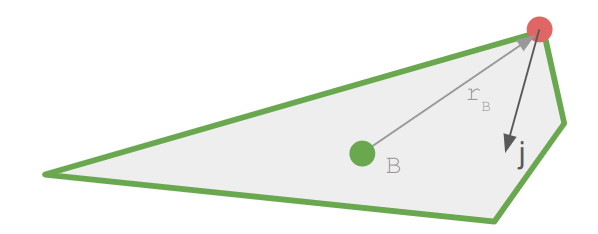
An impulse \(\boldsymbol{j}\) is an instantaneous change in momentum. They are very similar to forces, which influence velocity over time:

\[\boldsymbol{f} = m \boldsymbol{a} \quad \Rightarrow \quad \boldsymbol{v}’ \approx \boldsymbol{v} + \frac{1}{m} \boldsymbol{f} \Delta t\]

An impulse applied to a rigid body at a point \(\boldsymbol{r}\) relative to the body’s center of mass similarly affects its velocity, but without the need for the timestep:

\[\boldsymbol{v}’ = \boldsymbol{v} + \frac{1}{m} \boldsymbol{j}\]

This impulse also effects the angular velocity:

\[\boldsymbol{\omega}’ = \boldsymbol{\omega} + \boldsymbol{I}^{-1} \boldsymbol{r} \times \boldsymbol{j}\]

This update models the angular velocity in three dimensions, treating it as a vector. We can work out the equivalent 2d update where we just keep track of a scalar \(\omega\):

\[\begin{align}\boldsymbol{r} \times \boldsymbol{j} = \begin{bmatrix} r_x \\ r_y \\ 0\end{bmatrix}\end{align} \times \begin{bmatrix}j_x \\ j_y \\ 0\end{bmatrix} = \begin{bmatrix} 0 \\ 0 \\ r_x j_y – r_y j_x \end{bmatrix}\]

If we assume our inertia tensor is diagonal, and just pull out the z entry \(I_{zz}\), we get:

\[\omega’ = \omega + \frac{1}{I_{zz}} \left(r_x j_y – r_y j_x\right)\]

From here on out, if you see a scalar \(I\), it refers to \(I_zz\).

The Normal Impulse

In the last blog post, we used an impulse along the impact normal to cause two colliding rigid bodies to bounce off each other. We’re going to cover the same thing, but derive it instead of just take the result for granted.

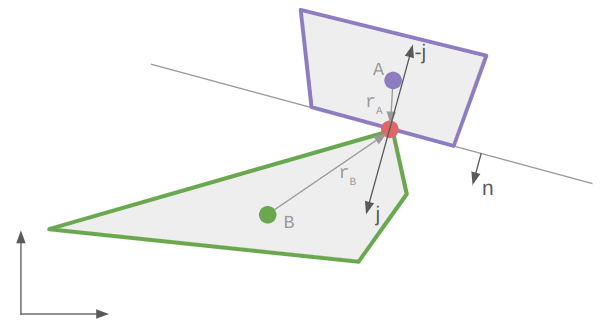
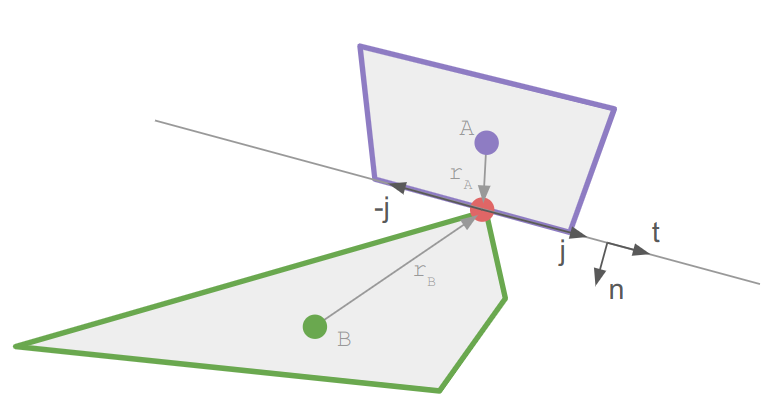
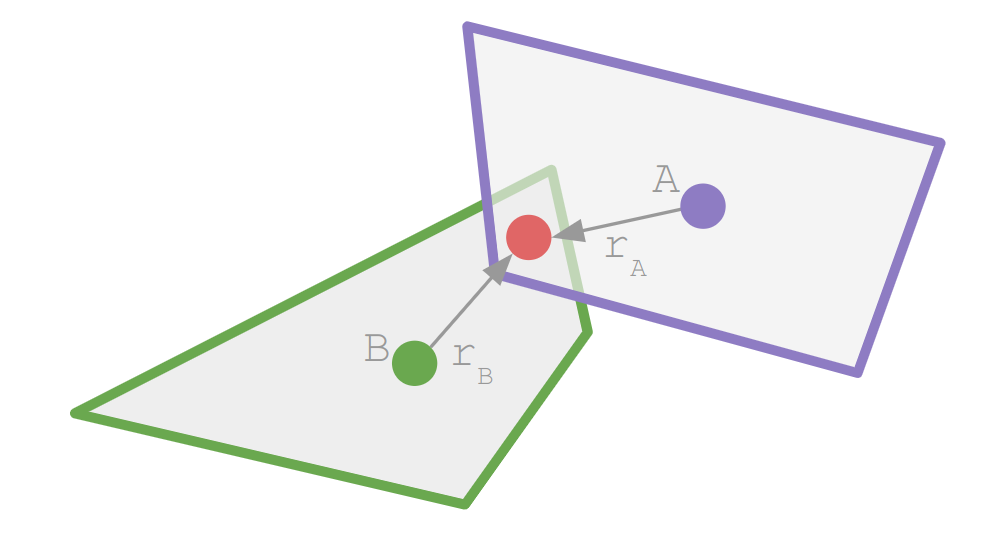
We have two bodies, A and B, and a contact point located at \(\boldsymbol{r}_A\) relative to body A’s center and at \(\boldsymbol{r}_B\) relative to body B’s center:

The velocity of the contact points on each body as they enter the collision is:

\[\begin{align}\boldsymbol{v}_{cA} & = \boldsymbol{v}_A + \boldsymbol{\omega}_A \times \boldsymbol{r}_A \\ \boldsymbol{v}_{cB} &= \boldsymbol{v}_B + \boldsymbol{\omega}_B \times \boldsymbol{r}_B \end{align}\]

In 2D that amounts to:

\[\boldsymbol{v}_{cA} = \begin{bmatrix}v_{A,x} \\ v_{A,y} \\ 0\end{bmatrix} + \begin{bmatrix}0 \\ 0 \\ \omega_A\end{bmatrix} \times \begin{bmatrix} r_{A,x} \\ r_{A,y} \\ 0\end{bmatrix} = \begin{bmatrix}v_{A,x} \\ v_{A,y} \\ 0\end{bmatrix} + \begin{bmatrix}-\omega r_{A,y} \\ \hphantom{-}\omega r_{A,x} \\ 0\end{bmatrix} \]

One can do this stuff in 3D and then drop or ignore the \(z\)-axis, but in my code I just stick with 2D:

Vec2f r; // radius
Vec2f v; // linear velocity vector
f32 w;   // angular velocity
Vec2f v_c = v + w * Rotr(r);

The contact velocity — how fast the contact points collide — is the relative speed of the contact points:

\[\boldsymbol{v}_\text{rel} = \boldsymbol{v}_{cB} \> – \boldsymbol{v}_{cA}\]

To derive the impulse, we stipulate two things. First, that the impulse lies in the normal direction:

\[\boldsymbol{j} = j \hat{\boldsymbol{n}}\]

Second, that the relative velocity along the normal direction reverses sign and changes by a factor \(e\):

\[\boldsymbol{v}_\text{rel}’ \cdot \hat{\boldsymbol{n}} = \> – e \> \boldsymbol{v}_\text{rel} \cdot \hat{\boldsymbol{n}}\]

This factor \(e\) is called the restitution. Setting it to zero produces a perfectly inelastic collision (because the resulting relative velocity in the normal direction is zero), whereas setting it to 1 produces a perfectly elastic collision that preserves the kinetic energy. Most objects use a value somewhere in-between.

We now have everything we need to derive the impulse. Let’s expand the left-hand side of the restitution equation:

\[\begin{align}\boldsymbol{v}_\text{rel}’ \cdot \hat{\boldsymbol{n}} \\ \left(\boldsymbol{v}_{cB}’ \> – \boldsymbol{v}_{cA}’\right) \cdot \hat{\boldsymbol{n}} \\ \left[\left(\boldsymbol{v}_B’ + \boldsymbol{\omega}_B’ \times \boldsymbol{r}_B\right) – \left(\boldsymbol{v}_A’ + \boldsymbol{\omega}_A’ \times \boldsymbol{r}_A\right)\right] \cdot \hat{\boldsymbol{n}} \\ \left[\left(\left[\boldsymbol{v}_B + \frac{1}{m_B}\boldsymbol{j}\right] + \left[\boldsymbol{\omega}_B + \boldsymbol{I}_B^{-1} \boldsymbol{r}_B \times \boldsymbol{j}\right] \times \boldsymbol{r}_B\right) – \left(\left[\boldsymbol{v}_A – \frac{1}{m_A}\boldsymbol{j}\right] + \left[\boldsymbol{\omega}_A – \boldsymbol{I}_A^{-1} \boldsymbol{r}_A \times \boldsymbol{j}\right] \times \boldsymbol{r}_A\right)\right] \cdot \hat{\boldsymbol{n}} \\ \left[\left(\left[\boldsymbol{v}_B + j \frac{1}{m_B}\hat{\boldsymbol{n}}\right] + \left[\boldsymbol{\omega}_B + j \boldsymbol{I}_B^{-1} \boldsymbol{r}_B \times \hat{\boldsymbol{n}}\right] \times \boldsymbol{r}_B\right) – \left(\left[\boldsymbol{v}_A – j \frac{1}{m_A}\hat{\boldsymbol{n}}\right] + \left[\boldsymbol{\omega}_A – j \boldsymbol{I}_A^{-1} \boldsymbol{r}_A \times \hat{\boldsymbol{n}}\right] \times \boldsymbol{r}_A\right)\right] \cdot \hat{\boldsymbol{n}} \\ \left[\boldsymbol{v}_\text{rel} + j \left(\frac{1}{m_B}\hat{\boldsymbol{n}} + \left[ \boldsymbol{I}_B^{-1} \boldsymbol{r}_B \times \hat{\boldsymbol{n}}\right] \times \boldsymbol{r}_B + \frac{1}{m_A}\hat{\boldsymbol{n}} + \left[ \boldsymbol{I}_A^{-1} \boldsymbol{r}_A \times \hat{\boldsymbol{n}}\right] \times \boldsymbol{r}_A\right)\right] \cdot \hat{\boldsymbol{n}} \\ \boldsymbol{v}_\text{rel} \cdot \hat{\boldsymbol{n}} + j \left(\frac{1}{m_A}\hat{\boldsymbol{n}} + \frac{1}{m_B}\hat{\boldsymbol{n}} + \left[ \boldsymbol{I}_A^{-1} \boldsymbol{r}_A \times \hat{\boldsymbol{n}}\right] \times \boldsymbol{r}_A + \left[ \boldsymbol{I}_B^{-1} \boldsymbol{r}_B \times \hat{\boldsymbol{n}}\right] \times \boldsymbol{r}_B\right) \cdot \hat{\boldsymbol{n}} \\ \boldsymbol{v}_\text{rel} \cdot \hat{\boldsymbol{n}} + j \left(\frac{1}{m_A}\hat{\boldsymbol{n}}\cdot \hat{\boldsymbol{n}} + \frac{1}{m_B}\hat{\boldsymbol{n}}\cdot \hat{\boldsymbol{n}} + \left[ \boldsymbol{I}_A^{-1} \boldsymbol{r}_A \times \hat{\boldsymbol{n}}\right] \times \boldsymbol{r}_A \cdot \hat{\boldsymbol{n}} + \left[ \boldsymbol{I}_B^{-1} \boldsymbol{r}_B \times \hat{\boldsymbol{n}}\right] \times \boldsymbol{r}_B \cdot \hat{\boldsymbol{n}}\right) \\ \boldsymbol{v}_\text{rel} \cdot \hat{\boldsymbol{n}} + j \left(\frac{1}{m_A} + \frac{1}{m_B} + \left[ \boldsymbol{I}_A^{-1} \boldsymbol{r}_A \times \hat{\boldsymbol{n}}\right] \times \boldsymbol{r}_A \cdot \hat{\boldsymbol{n}} + \left[ \boldsymbol{I}_B^{-1} \boldsymbol{r}_B \times \hat{\boldsymbol{n}}\right] \times \boldsymbol{r}_B \cdot \hat{\boldsymbol{n}}\right) \end{align}\]

We then equate this to \( – e \> \boldsymbol{v}_\text{rel} \cdot \hat{\boldsymbol{n}}\) and solve for the impulse scalar \(j\), yielding:

\[j = \frac{-(1+e) \boldsymbol{v}_\text{rel} \cdot \hat{\boldsymbol{n}} }{ \frac{1}{m_A} + \frac{1}{m_B} + \left(\left[ \boldsymbol{I}_A^{-1} \boldsymbol{r}_A \times \hat{\boldsymbol{n}}\right] \times \boldsymbol{r}_A + \left[ \boldsymbol{I}_B^{-1} \boldsymbol{r}_B \times \hat{\boldsymbol{n}}\right] \times \boldsymbol{r}_B\right) \cdot \hat{\boldsymbol{n}} }\]

This is the equation that Wikipedia gives us.

The equation I gave in the last blog post looks a little different:

\[j = \frac{-(1+e)\boldsymbol{v}_\text{rel} \cdot \hat{\boldsymbol{n}}}{\frac{1}{m_A} + \frac{1}{m_B} + \frac{(\boldsymbol{r}_A \times \boldsymbol{n})^2}{I_A} + \frac{(\boldsymbol{r}_B \times \boldsymbol{n})^2}{I_B}}\]

It only differs in the terms involving the moment of inertia.

Let’s expand the Wikipedia version:

\[\begin{align}\left[\left(\boldsymbol{I}^{-1} \boldsymbol{r} \times \hat{\boldsymbol{n}}\right) \times \boldsymbol{r}\right] \cdot \hat{\boldsymbol{n}} &= \left(\left(\frac{1}{I}\begin{bmatrix}r_x \\ r_y \\ 0\end{bmatrix} \times \begin{bmatrix} \hat{n}_x \\ \hat{n}_y \\ 0 \end{bmatrix}\right) \times \begin{bmatrix}r_x \\ r_y \\ 0\end{bmatrix}\right) \cdot \begin{bmatrix}\hat{n}_x \\ \hat{n}_y \\ 0\end{bmatrix} \\ &= \left(\frac{1}{I}\begin{bmatrix}0 \\ 0 \\ r_x \hat{n}_y – r_y \hat{n}_x\end{bmatrix} \times \begin{bmatrix}r_x \\ r_y \\ 0\end{bmatrix}\right) \cdot \begin{bmatrix}\hat{n}_x \\ \hat{n}_y \\ 0\end{bmatrix} \\ &= \frac{1}{I}\begin{bmatrix}-r_x r_y \hat{n}_y + r_y^2 \hat{n}_x \\ r_x^2 \hat{n}_y – r_x r_y \hat{n}_x \\ 0 \end{bmatrix} \cdot \begin{bmatrix}\hat{n}_x \\ \hat{n}_y \\ 0\end{bmatrix} \\ &= \frac{1}{I}\left( r_x^2 \hat{u}_y^2 – 2 r_x r_y \hat{u}_x \hat{u}_y + r_y^2 \hat{u}_y^2 \right) \end{align}\]

We get the same thing if we expand the other version:

\[\begin{align}\frac{1}{I}\left(\boldsymbol{r} \times \hat{\boldsymbol{n}}\right)^2 &= \frac{1}{I}\left(r_x \hat{n}_y – r_y \hat{n}_x\right)^2 \\ &= \frac{1}{I}\left( r_x^2 \hat{u}_y^2 – 2 r_x r_y \hat{u}_x \hat{u}_y + r_y^2 \hat{u}_y^2 \right)\end{align}\]

The two formulations are equal, but assume that we’re working in 2D and that the moment of inertia tensor is diagonal with every entry equal to \(I\). The Wikipedia version is more general, and can handle 3D collisions and general inertia tensors.

The normal impulse \(j\) in 2D is thus

\[j = \> -(1+e) \> m_\text{eff} \> \boldsymbol{v}_\text{rel} \cdot \hat{\boldsymbol{n}} \]

where the effective mass is

\[m_\text{eff} = \left(\frac{1}{m_A} + \frac{1}{m_B} + \frac{(\boldsymbol{r}_A \times \hat{\boldsymbol{n}})^2}{I_A} + \frac{(\boldsymbol{r}_B \times \hat{\boldsymbol{n}})^2}{I_B}\right)^{-1}\]

After calculating it, we apply an impulse \(j \hat{\boldsymbol{n}}\) to body B and the negated impulse to body A. Note that we only apply an impulse if the relative velocity is causing the bodies to move into contact (\(\boldsymbol{v}_\text{rel} \cdot \hat{\boldsymbol{n}} < 0\)), otherwise the contact point already has a separating velocity.

The restitution \(e\) will depend on the colliding bodies. One convenient way to get it is to assign an restitution to each rigid body, and then use the maximum between the two for the collision. That allows bounciness to win out:

\[e = \max\left(e_A, e_B\right)\]

Friction Impulse

The normal impulse takes care of the relative penetration speed, but does nothing in the tangent direction along the contact line. We typically want shapes that slide along each other to have friction — that is what the friction impulse, or tangent impulse, is for.

Wikipedia and other websites will at this point show you a fancy diagram for Coulomb friction depicting the friction cone. I don’t find that to be particularly illuminating.

Instead, I simply like to think about Coulomb friction as:

  • compute a tangent impulse that causes the relative tangent velocity to be zero (\(e=0\))
  • if the required tangent impulse is sufficiently small, apply it (static friction)
  • if the required tangent impulse is too large, cap it out and apply that instead (dynamic friction)

Let’s derive the update ourselves again.

The friction impulse acts in the tangent direction \(\hat{\boldsymbol{t}}\), which we can get by rotating the normal. We once again have a scalar impulse:

\[j = j \hat{\boldsymbol{t}}\]

We compute the tangent that causes a zero relative tangent velocity (\(e = 0\)).

These two conditions are structurally the same as the normal impulse, except \(e\) is fixed. We can directly apply our previous equations to get:

\[j = \> – m_\text{eff} \> \boldsymbol{v}_\text{rel} \cdot \hat{\boldsymbol{t}}\]

where the effective mass is now in the tangent direction:

\[m_\text{eff} = \left(\frac{1}{m_A} + \frac{1}{m_B} + \frac{(\boldsymbol{r}_A \times \hat{\boldsymbol{t}})^2}{I_A} + \frac{(\boldsymbol{r}_B \times \hat{\boldsymbol{t}})^2}{I_B}\right)^{-1}\]

As long as this impulse is small enough (in magnitude), we apply it in order to prevent any tangential sliding. If it is large enough, we switch from static friction to dynamic friction:

\[j = \begin{cases} j & \text{if } |j| \leq j_\text{static} \\ j_\text{dynamic} & \text{otherwise} \end{cases}\]

Easy peasy.

The static and dynamic friction values are typically multiples of the normal impulse. We multiply the normal impulse by \(\mu_\text{static}\) to get the static friction impulse threshold and by \(\mu_\text{dynamic}\) to get the dynamic friction impulse threshold. Like the restitution, these are properties of each body, and we can obtain values to use for a pair of bodies by combining their values. Here it is recommended to use the square root of the product, which lets extremely low-friction (slippery) values dominate:

\[\mu_\text{static} = \sqrt{\vphantom{P}\mu_{A,\text{static}} \cdot \mu_{B,\text{static}}}\]

Revolute Joints

There are other things we can do with impulses. One of the main ones is to model attachment points between rigid bodies. These revolute joints allow rotation, but force the bodies to maintain a constant distance vector to the joint:

Revolute joints are useful for all sorts of things, including swinging:

I didn’t have a lot of luck finding information on how to enforce revolute joints between rigid bodies in 2D. Thankfully, we can derive the necessary impulse ourselves.

The property we want to enforce is that the contact velocity at the joint after the impulse be zero:

\[\boldsymbol{v}_\text{rel}’ = \boldsymbol{0}\]

We can expand that out:

\[\begin{align}\boldsymbol{v}_\text{rel}’ &= \boldsymbol{0} \\ \boldsymbol{v}_{cB}’ \> – \boldsymbol{v}_{cA}’ &= \boldsymbol{0} \\ \left(\boldsymbol{v}_B’ + \boldsymbol{\omega}_B’ \times \boldsymbol{r}_B\right) – \left(\boldsymbol{v}_A’ + \boldsymbol{\omega}_A’ \times \boldsymbol{r}_A\right) &= \boldsymbol{0} \\ \left(\left[\boldsymbol{v}_B + \frac{1}{m_B}\boldsymbol{j}\right] + \left[\boldsymbol{\omega}_B + \boldsymbol{I}_B^{-1} \boldsymbol{r}_B \times \boldsymbol{j}\right] \times \boldsymbol{r}_B\right) – \left(\left[\boldsymbol{v}_A – \frac{1}{m_A}\boldsymbol{j}\right] + \left[\boldsymbol{\omega}_A – \boldsymbol{I}_A^{-1} \boldsymbol{r}_A \times \boldsymbol{j}\right] \times \boldsymbol{r}_A\right) &= \boldsymbol{0} \\ \boldsymbol{v}_\text{rel} + \left(\frac{1}{m_B}\boldsymbol{j} + \left[\boldsymbol{I}_B^{-1} \boldsymbol{r}_B \times \boldsymbol{j}\right] \times \boldsymbol{r}_B\right) + \left(\frac{1}{m_A}\boldsymbol{j} + \left[\boldsymbol{I}_A^{-1} \boldsymbol{r}_A \times \boldsymbol{j}\right] \times \boldsymbol{r}_A\right) &= \boldsymbol{0} \\ \boldsymbol{v}_\text{rel} + \left(\frac{1}{m_A} + \frac{1}{m_B}\right)\boldsymbol{j} + \left(\boldsymbol{I}_A^{-1} \boldsymbol{r}_A \times \boldsymbol{j}\right) \times \boldsymbol{r}_A + \left(\boldsymbol{I}_B^{-1} \boldsymbol{r}_B \times \boldsymbol{j}\right) \times \boldsymbol{r}_B &= \boldsymbol{0}\end{align}\]

If we work out the cross products, then we end up with the following system of equations:

\[\begin{bmatrix}\frac{1}{m_A} + \frac{1}{m_B} + \frac{1}{I_A}r_{Ay}^2 + \frac{1}{I_B}r_{By}^2 & -\left(\frac{1}{I_A}r_{Ax}r_{Ay} + \frac{1}{I_B}r_{Bx}r_{By}\right) \\ -\left(\frac{1}{I_A}r_{Ax}r_{Ay} + \frac{1}{I_B}r_{Bx}r_{By}\right) & \frac{1}{m_A} + \frac{1}{m_B} + \frac{1}{I_A}r_{Ax}^2 + \frac{1}{I_B}r_{Bx}^2\end{bmatrix}\begin{bmatrix} j_x \\ j_y\end{bmatrix} = \begin{bmatrix}-v_{\text{rel},x} \\ -v_{\text{rel},y}\end{bmatrix}\]

We can write a simple function that can solve such a \(2 \times 2\) linear system:

// Solve a 2x2 system of linear equations
// [a b][x1] = [e]
// [c d][x2] = [f]
// This method assumes that it will succeed, which
// requires that the matrix be invertible.
template <typename T>
void Solve(T a, T b, T c, T d, T e, T f, T& x1, T& x2) {
    T det = d * a - c * b;
    x2 = (a * f - c * e) / det;
    x1 = (e - b * x2) / a;
}

and then use that to solve for our impulse.

// Compute the effective mass components.
f32 m_eff_11 = inv_m1 + inv_m2 + inv_I1 * r1.y * r1.y + inv_I2 * r2.y * r2.y;
f32 m_eff_12 = -(inv_I1 * r1.x * r1.y + inv_I2 * r2.x * r2.y);
f32 m_eff_22 = inv_m1 + inv_m2 + inv_I1 * r1.x * r1.x + inv_I2 * r2.x * r2.x;

// Solve for the impulse:
//  [m_eff_11   m_eff_12][j.x] = [-v_rel.x]
//  [m_eff_12   m_eff_22][j.y] = [-v_rel.y]
Vec2f j;
Solve(m_eff_11, m_eff_12, m_eff_12, m_eff_22, -v_rel.x, -v_rel.y, j.x, j.y);

We can then apply the resulting impulse to both bodies and perform a positional correction. I weight the correction such that the target joint location is biased toward the heavier object (that way joints on infinite-mass objects never move).

Conclusion

This post set the mathematical foundation for impulses, then derived the normal, friction, and revolute joint impulses. In each case, we looked at what was being preserved, formulated that mathematically, and massaged the equations to back out the impulse. While the equations were long at times, they did not lead us astray and we were able to find our way to some solid physics.

2D Collision Detection and Resolution

This post is an update on the sidescroller project. In short, I still find the project interesting, and as long as that is true, I want to work toward my original goal of a 2D sidescroller with arbitrary level geometry (i.e., not based on tiles or AABBs). I’ve achieved my stated goal of learning how to use the GPU and roll my own skeletal animation system, but I obviously haven’t built a game. A full game was, and still is, out of the question, but it would be cool to have something with a game loop and perhaps a complete level and a boss.

Fleshing out the game further requires fleshing out more of the game-play design. As such, physics must happen.

This blog post covers how I’m going about collision detection and resolution for convex polygons.

The Problem

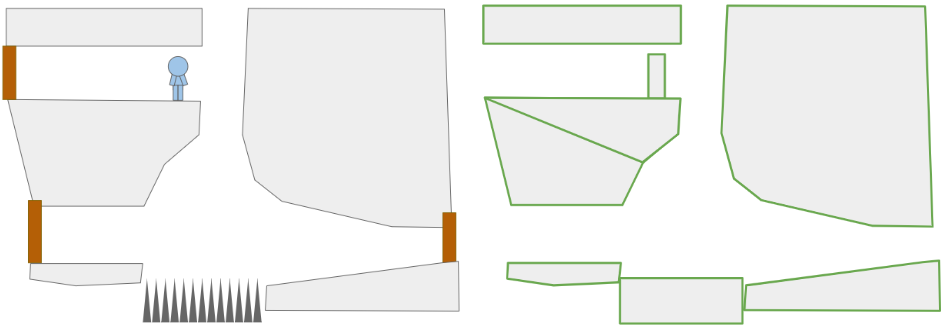
We wish to simulate objects moving around in a 2D space. While we might eventually have fancy objects like ropes, let’s start by restricting ourselves to convex polygons:

A crude rendition of a 2D platformer scene (left) and the convex polygons in it (right).

As we can see, nonconvex polygons can be represented by multiple convex polygons, so this isn’t all that restrictive.

Most of the polygons will be static. The floors and ceilings, for the most part, do not move. Entities like the player, monsters, eventual ropes, crates, etc. will need to move. That movement needs to obey the laws of physics, which mainly means integrating accelerations into velocities, velocities into positions, and handling collisions.

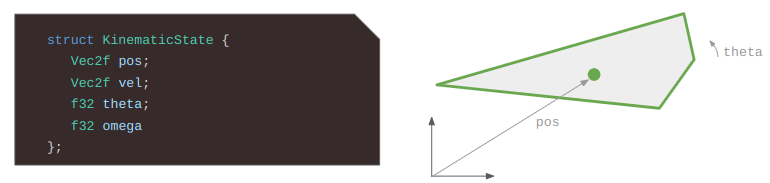
More formally, we have a scene comprised of \(m\) rigid bodies, some of which are static and some of which are dynamic. Each rigid body is defined by a convex polygon and a 2D state. Each convex polygon is represented as a list of vertices in counter-clockwise (right-hand) order:

More serious implementations might include additional information, like precomputed edge normals or an enclosing axis-aligned box for broad-phase collision detection, but let’s leave those optimizations out for now. And yes, I could have used an std::vector but I like having trivially copyable types since I’m serializing and deserializing my levels to disk and I don’t want to think too hard when doing that.

I made the simplification of keeping track of static bodies separately from dynamic rigid bodies. For the static bodies, the polygon vertices are directly defined in the world frame. For the dynamic bodies, the polygon vertices are defined in the body frame of the entity, and are then transformed according to the entity’s state:

A vertex \(\boldsymbol{v}\) in the body frame of a polygon can be transformed into the world frame according to:

\[\begin{bmatrix}v_x \\ v_y\end{bmatrix}_\text{world} = \begin{bmatrix}\cos \theta & -\sin \theta \\ \sin \theta & \hphantom{-}\cos \theta\end{bmatrix}\begin{bmatrix}v_x \\ v_y\end{bmatrix}_\text{body} + \begin{bmatrix}p_x \\ p_y\end{bmatrix}\]

As the physics evolve, these states change, but the polygons do not. In every frame, we’ll accumulate forces and torques on our bodies and use them to update the state. We’ll also have to perform collision detection and handle any resulting forces and torques.

State Propagation

We need to simulate the laws of motion. That is, solve \(F = m \> a\) and compute

\[\begin{matrix}v(t + \Delta t) = v(t) + \int a(t) \> dt \\ p(t + \Delta t) = p(t) + \int v(t) \> dt \end{matrix}\]

except in 2 dimensions with torques and rotations.

We can’t do exact integration, so we’ll have to rely on approximations. Games tend to run at pretty high frame rates, so its reasonable to approximate the update across a single frame using the Euler method:

\[\begin{align} u(t + \Delta t) &= u(t) + a_x(t) \Delta t \\ v(t + \Delta t) &= v(t) + a_y(t) \Delta t \\ \omega(t + \Delta t) &= \omega(t) + \alpha(t) \Delta t \\ x(t + \Delta t) &= x(t) + u(t) \Delta t \\ y(t + \Delta t) &= y(t) + v(t) \Delta t \\ \theta(t + \Delta t) &= \theta(t) + \omega(t) \Delta t\end{align} \]

or written a bit more compactly:

\[\begin{align} u’ &= u + a_x \Delta t \\ v’ &= v + a_y \Delta t \\ \omega’ &= \omega + \alpha \Delta t \\ x’ &= x + u \Delta t \\ y’ &= y + v \Delta t \\ \theta’ &= \theta + \omega \Delta t\end{align} \]

Apparently, doing this would work okay, but using symplectic Euler integration is a bit more stable. It uses the updated velocities for the position update:

\[\begin{align} u’ &= u + a_x \Delta t \\ v’ &= v + a_y \Delta t \\ \omega’ &= \omega + \alpha \Delta t \\ x’ &= x + u’ \Delta t \\ y’ &= y + v’ \Delta t \\ \theta’ &= \theta + \omega’ \Delta t\end{align} \]

Our physics system will perform this update for every dynamic body in every game tick. After doing so, it needs to handle collisions.

Properly handling collisions is a whole big field and there is potentially a lot to talk about. In an ideal sense, if we were to identify a collision, we’d back up in time to where the collision first occurred, and handle it there. That’s more accurate, but also complicated. In a scene with a bunch of objects and a bunch of collisions, we don’t want to be sorting by a bunch of collision times.

Instead, I’ll be taking inspiration from Verlet integration and enforce constraints via iteration. A single tick of the physics system becomes:

void PhysicsEngine::Tick(f32 dt) {
    // Euler integration
    for (auto& rigid_body : rigid_bodies_) {
        EulerIntegrationStep(&rigid_body.state, dt);
    }

    for (int i = 0; i < 4; i++) {
        EnforceConstraints();
    }
}

We’re running Euler integration once, then running several iterations of constraint enforcement! This iterative approach helps things shake out because oftentimes, which you resolve one constraint, you start violating another. Its a pretty messy way to do things, but its so simple to implement and can be surprisingly robust.

What constraints will we enforce? For now we’re only going to prevent polygons from interpenetrating. In general we can enforce a bunch of other types of constraints, most notably joints between bodies.

Collision Detection

Alright, all that pretext to get to the meat and potatoes of this post.

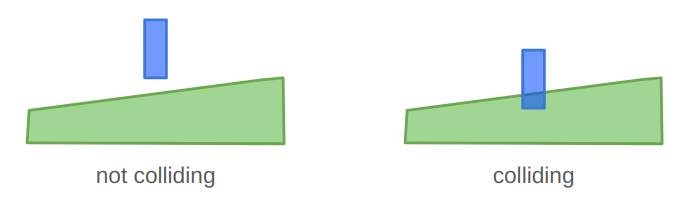
In order to prevent our rigid bodies from interpenetrating, we need to detect when they collide:

We can do this in a pairwise manner, only considering the world-space polygons of two rigid bodies at once.

We start by observing that two polygons are in collision if they share an interior. While that may be technically true, it doesn’t really tell us how to efficiently compute intersections.

A more useful observation is that two polygons A and B are in collision if

  • A contains any vertex of B, or
  • B contains any vertex of A, or
  • any edge in A intersects any edge in B.

This definition actually works for nonconvex as well as convex polygons (but don’t ask me about degenerate polygons that self-intersect and such). Unfortunately, its a bit inefficient. If A has \(n\) vertices and B has \(m\) vertices, then we’d be doing \(n+m\) polygon–point collision checks and then \(nm\) edge intersection checks. If we keep our polygons simple then it isn’t all that bad, but there are better methods.

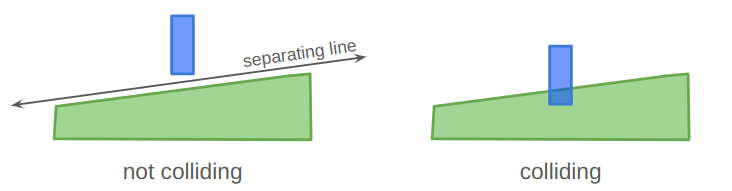
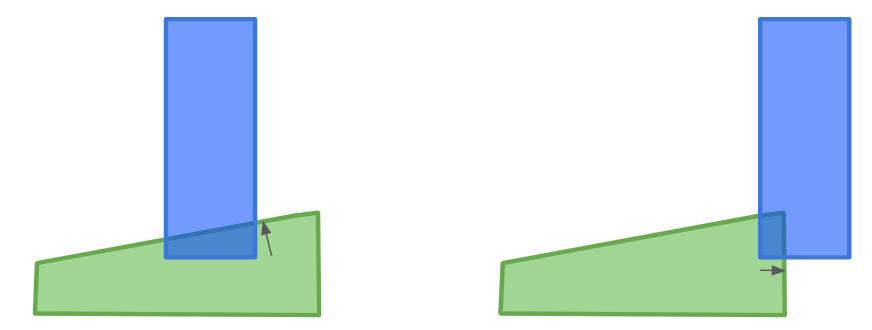
One go-to method for 2D polygon collision checking is the separating axis theorem, which states that if two convex polygons A and B are in collision, then you cannot draw a line between them. (Sometimes these things seem kind of obvious in retrospect…):

We can draw a separating line between the two polygons on the left, but cannot for the colliding ones on the right.

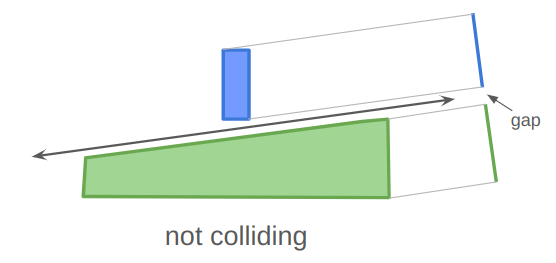
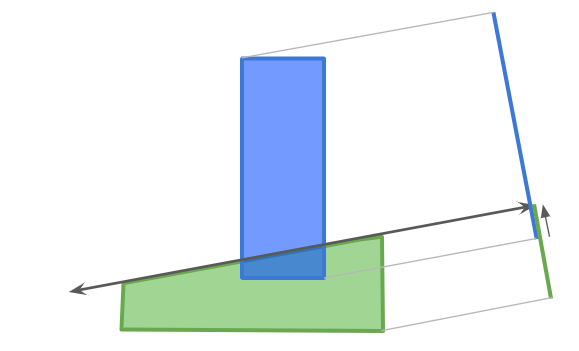
One direct consequence of the separating axis theorem is that if you can draw a separating line, then the projection of each shape perpendicular to that line will also have a gap:

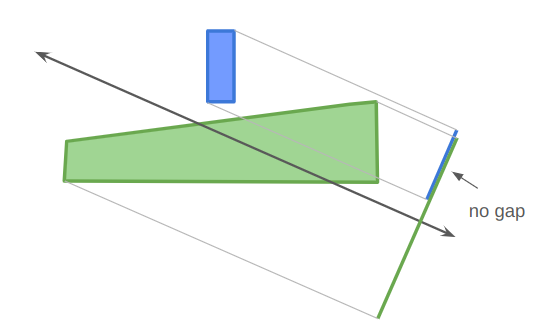
Similarly, if you project the two shapes in any direction that they cannot be separated in, then their projections will not have a gap:

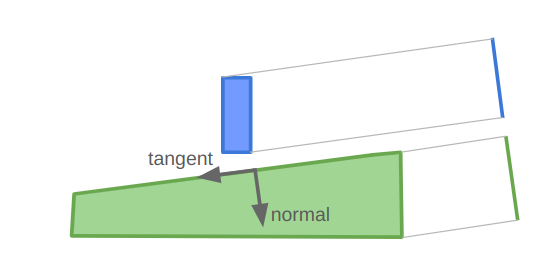
For convex polygons that are not colliding, a separating axis can always be constructed along one of the polygon’s edges. That is great — it means we only need to consider \(m + n\) possible separating axes.

Our collision detection algorithm is thus:

  • project both polygons onto all edge normals
  • if there are any gaps, then they do not intersect
  • otherwise, they intersect

Projecting a polygon along an axis is pretty easy:

struct PolygonProjection {
    f32 lo;
    f32 hi;
};

Overlap ProjectPolygonAlongDirection(
    const ConvexPolygon& polygon,
    const Vec2f normal)
{
    PolygonProjection proj;
    proj.lo = std::numeric_limits<f32>::infinity();
    proj.hi = -std::numeric_limits<f32>::infinity();
    for (u8 i = 0; i < polygon.n_pts; i++) {
        const f32 d = Dot(normal, polygon.pts[i]);
        proj.lo = std::min(d, overlap.lo);
        proj.hi = std::max(d, overlap.hi);
    }
    return proj;
}

Notice that the direction we pass in is the edge normal, not the edge tangent. This is because the normal is used to measure the distance away from the separating axis.

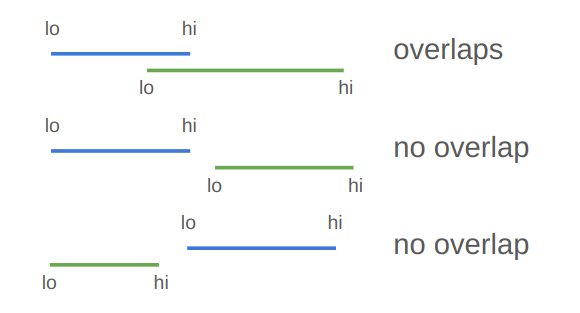
Two projects have a gap if proj_a.hi <= proj_b.lo || proj_b.hi <= proj_a.lo. Otherwise, they overlap.

Our collision detection algorithm is thus:

bool CollidesInAnAxisOfA(
    const ConvexPolygon& A,
    const ConvexPolygon& B)
{
    Vec2f a1 = A.pts[A.n_pts-1];
    for (u8 i = 0; i < A.n_pts; i++) {
        const Vec2f& a2 = A.pts[i];
        const Vec2f tangent = Normalize(b - a);
        const Vec2f normal = Rotr(tangent);
 
        PolygonProjection proj_a = 
        ProjectPolygonAlongDirection(A, normal);
        PolygonProjection proj_b = 
             ProjectPolygonAlongDirection(B, normal);
        if (proj_a.hi > proj_b.lo && proj_b.hi > proj_a.lo) {
            return true; // no gap, thus a collision
        }
    }
}

bool Collides(
    const ConvexPolygon& A,
    const ConvexPolygon& B)
{
   return CollidesInAnAxisOfA(A, B) || CollidesInAnAxisOfA(B, A);
}

Penetration Vectors

Once we have determined that two polygons are colliding, we need to separate them. In order to do that, we need to find the penetration vector, or the shortest vector that can be added to one of the polygons such that they no longer overlap:

Rather than figuring this out from scratch, let’s modify our collision-checking routine to also figure this out.

When we project the two polygons into a direction, then the overlap of their projections is the distance we would need to move them in the projection direction to separate them:

We can thus find the penetration vector by keeping track of the smallest overlap among all of the projections we do!

struct CollisionResult {
    bool collides;   // whether there is a collision
    f32 penetration; // the length of the penetration vector
    Vec2f dir;       // the unit penetration direction
}

// A helper function that projects along all of the edge tangents of A.
void CollisionHelper(
    const ConvexPolygon& A,
    const ConvexPolygon& B,
    CollisionResult* retval)
{
    Vec2f a1 = A.pts[A.n_pts-1];
    for (u8 i = 0; i < A.n_pts; i++) {
        const Vec2f& a2 = A.pts[i];
        const Vec2f tangent = Normalize(b - a);
        const Vec2f normal = Rotr(tangent);
        
        PolygonProjection proj_a = 
            ProjectPolygonAlongDirection(A, normal);
        PolygonProjection proj_b = 
            ProjectPolygonAlongDirection(B, normal);
        if (proj_a.hi > proj_b.lo && proj_b.hi > proj_a.lo) {
            retval.collides = true;
            return; // no gap, thus a collision
        }

        // Keep track of the smallest penetration
        f32 penetration = min(
            abs(proj_a.lo - proj_b.hi),
            abs(proj_a.hi - proj_b.lo))
        if (penetration < retval.penetration) {
            retval.penetration = penetration;
            retval.dir = normal;
        }
    }
}

CollisionResult Collides(
    const ConvexPolygon& A,
    const ConvexPolygon& B)
{
   CollisionResult retval = {};
   retval.penetration = std::numeric_limits<f32>::infinity();
   CollisionHelper(A, B, &retval);
   if (retval.collides) return retval;
   CollisionHelper(B, A, &retval);
   return retval;
}

Collision Manifolds

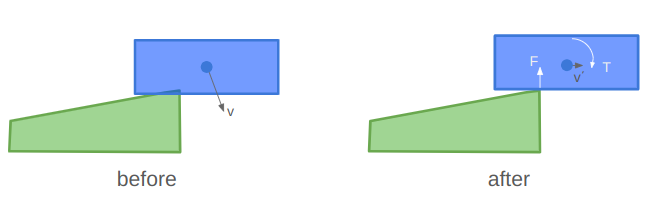
Our collision resolution logic can separate the polygons, but that isn’t enough to get realistic physics. We want to affect more than just their positions, but also their velocities and angular states. A collision should result in an impulse force that changes each body’s velocity and angular acceleration.

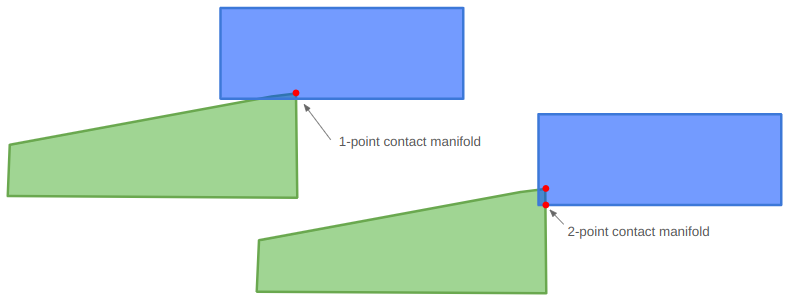
The torque is the counter clockwise force times the radius to the rigid body’s center of mass. That means we need the radius, which means knowing where the force is applied. So far we’ve only calculated the penetration normal, not where the penetration occurred.

Properly determining a collision response requires computing the contact point or contact manifold. Eric Catto has a nice GDC 2007 slide deck on this, but I wasn’t able to track down the actual talk that goes along with it, so it leaves something to be desired.

The contact manifold represents the points at which two objects come into contact. Ideally that would be the very first points that touch as two objects collide, but because of our discrete time steps, we have to work with partial overlaps:

In some cases, a contact manifold should be an entire edge, but we’ll be approximating it using at most two points.

The contact manifold can be constructed using either polygon as a reference. We’ll be moving the polygons out of collision afterwards, so the contact manifold will be roughly the same independent of which polygon we choose:

The reference polygon will be the one with the edge that the penetration vector is normal to. We’ll call that edge the reference edge. The other polygon is called the incident polygon, and we’ll need to identify an incident edge that crosses the reference edge.

We will start by running our latest collision resolution algorithm, which gives us a penetration unit vector and magnitude. We have to slightly modify that code to keep track of which polygon it came from, so that we know which polygon is the reference polygon.

If it determines that there is no collision, we are done. Otherwise, we then identify the incident edge, which shall be the edge in the incident polygon whose outward normal is most opposed to the reference edge normal:

int inc_edge_index = 0;
int inc_edge_index_succ = 0;
f32 min_dot = std::numeric_limits<f32>::infinity();

int i_prev = I->n_pts - 1;
for (u8 i = 0; i < I->n_pts; i++) {
    common::Vec2f normal_i = Rotl(Normalize(I->pts[i] - I->pts[i_prev]));
    f32 dot = common::Dot(normal, normal_i);
    if (dot < min_dot) {
        min_dot = dot;
        inc_edge_index = i_prev;
        inc_edge_index_succ = i;
        }
    i_prev = i;
}

We then clip the incident edge to lie between the end caps of the reference edge:

This clipping is done in two steps — first by clipping the incident edge (which is a line segment) to lie on the negative side of the left halfspace and then again to lie on the negative side of the right halfspace. We can clip a line segment to a halfspace using the dot product of the endpoints with the halfspace normal vector (which is tangent to the reference edge) and comparing that to the dot product of the reference edge endpoint.

struct ClipResult {
   int n_pts;
   Vec2f pts[2];
};
ClipResult ClipSegmentToHalfspace(
    const Vec2f a,
    const Vec2f b,
    const Vec2f plane_normal,
    const f32 plane_offset,
    const int ref_edge_index) {

    ClipResult retval = {};

    // Compute the distances of the end points to the plane
    f32 dist_a = Dot(plane_normal, a) - plane_offset;
    f32 dist_b = Dot(plane_normal, b) - plane_offset;

    // If the points are on the negative side of the plane, keep them
    if (dist_a <= 0.0f) {
        retval.pts[retval.n_pts] = a;
        retval.n_pts += 1;
    }
    if (dist_b <= 0.0f) {
        retval.pts[retval.n_pts] = b;
        retval.n_pts += 1;
    }

    // If the points are on different sides of the plane, 
    // then we need to find the intersection point. 
    // (We don't have to do anything in the case that the
    // points are both on the positive side of the plane.)
    if (dist_a * dist_b < 0.0f) {
        // Keep the intersection points
        f32 interp = distance_0 / (distance_0 - distance_1);
        retval.pts[retval.n_pts] = a + interp * (b - a);
        retval.n_pts += 1;
    }

    return retval;
}

If we fully clip the segment away (which shouldn’t happen), then we don’t have a real intersection.

The collision manifold will consist of all endpoints in the clipped incident edge that penetrate across the reference edge. This explains how we can end up with either a 1- or a 2-point collision manifold. We can once again use a dot product and compare it to a base offset:

f32 face_offset = Dot(reference_normal, reference_a);
for (int i = 0; i < 2; i++) {
    // Get the distance of the ith endpoint along the normal from the
    // reference face. A negative value indicates penetration into the
    // reference polygon.
    f32 separation = Dot(reference_normal, clip.pts[i]) - face_offset;
    if (separation <= kEps) {
        manifold.points[manifold.n_pts] = clip.pts[i];
        manifold.n_pts += 1;
    }
}

I coded up a visualization of this computation to help with debugging. The red vector is the unit normal along the reference edge, the little aligned blue vector is the same vector scaled by the penetration, the little red square is the 1 point in this collision manifold, and the little green square is the other endpoint of the clipped incident edge, which in this case was not accepted into the collision manifold:

We can set up a case where there are two points in our collision manifold:

I can interact with my visualization by translating or rotation the one square around:

Collision Resolution

Now that we can detect collisions, calculate penetration vectors, and calculate a collision manifold, we can finally do the work of resolving a collision. Wikipedia has a good overview of this, but I’ll write it out here for good measure.

If we have a collision, then our contact manifold will contain one or two contact points. For starters let’s work with the case of a single contact point \(\boldsymbol{c}\). We’ll assume that body A is the reference polygon.

We can simulate the effect of a collision by imparting opposed impulses to the colliding bodies. This impulse is the integral of the force acting on each body over that collision timestep.

The impulse force depends on the relative velocity between the two objects. Let \(\boldsymbol{r}_A\) and \(\boldsymbol{r}_B\) be the vectors from each body’s center of mass (usually its centroid) to the contact point. Then we can calculate the relative velocity at the contact point:

\[\boldsymbol{v}_\text{rel} = (\boldsymbol{v}_B + \omega_B \times \boldsymbol{r}_B) – (\boldsymbol{v}_A + \omega_A \times \boldsymbol{r}_A)\]

The impulse is zero if this relative velocity along the normal is positive.

The normal impulse for the objects is:

\[j = \frac{-(1+e)\boldsymbol{v}_\text{rel} \cdot \boldsymbol{n}}{\frac{1}{m_A} + \frac{1}{m_B} + \frac{(\boldsymbol{r}_A \times \boldsymbol{n})^2}{I_A} + \frac{(\boldsymbol{r}_B \times \boldsymbol{n})^2}{I_B}}\]

where \(e \in [0,1]\) is the coefficient of restitution that determines how elastic the collision is, \(m_A\) and \(m_B\) are the polygon masses, and \(I_A\) and \(I_B\) are their moments of inertia.

We then update each polygon’s linear and angular speed according to:

\[\begin{align} \boldsymbol{v}_A’ &= \boldsymbol{v}_A \> – \frac{j}{m_A} \boldsymbol{n} \\ \boldsymbol{v}_B’ &= \boldsymbol{v}_B + \frac{j}{m_B} \boldsymbol{n} \\ \omega_A’ &= \omega_A \> – \frac{j}{I_A} \left(\boldsymbol{r}_A \times \boldsymbol{n}\right) \\ \omega_B’ &= \omega_B + \frac{j}{I_B} \left(\boldsymbol{r}_B \times \boldsymbol{n} \right)\end{align}\]

When there are two points in the contact manifold, one might be tempted to approximate the collision with their mean. I found that that doesn’t quite work correctly in all cases. For example, in the situation below, the rotation causes the estimated contact point to move right, which imparts a torque in the wrong direction:

In order to fix this, I process both contact points, but weight the impulse in proportion to the penetration depth.

Positional correction is similar. To resolve the collision, we simply need to separate the two bodies along the penetration unit normal by a distance equal to the penetration \(\delta\). We could split the difference and shift the incident polygon by \(\delta / 2\) and the reference polygon by \(-\delta / 2\) along the normal, but we also want to account for their relative masses.

To account for the masses, we’d want to move the incident polygon by

\[\frac{\delta}{2} \frac{m_A}{m_A + m_B}\]

and the reference polygon by

\[-\frac{\delta}{2} \frac{m_B}{m_A + m_B}\]

where \(m_B\) is the mass of the incident polygon and \(m_A\) is the mass of the reference polygon. The heavier polygon is moved less.

However, as stated earlier, rather than fully resolve the collision, we will perform multiple, smaller resolution steps. If our penetration has a magnitude \(\delta\), we only apply \(\beta \delta\) where \(\beta\) is between 0 and 1, typically something like 0.4. We move the incident polygon in the penetration normal direction by that amount, and the reference polygon by the opposite amount. This will help jostle multiple conflicting collisions in a nice way such that they hopefully find a stable, valid solution.

For a nice code reference for all this, I recommend Randy Paul’s Impulse Engine.

Conclusion

And that’s enough to get us some pretty solid solid-body physics!

We actually did quite a lot in this post. We set off to do polygon collision resolution, started with polygon intersections, realized we also needed to figure out the penetration vector, did that, and then realized that to get appropriate impulses we needed to compute approximate collision manifolds. We then used that information to compute impulses, apply them, and to physically separate any colliding bodies.

We don’t have any friction. Its actually pretty easy to add, but I figured this post was already long enough.

We haven’t yet talked about any sort of spatial partitioning or other broad-phase collision tactics. No special memory allocation strategies, stable contact points, or joints. As always, there is a whole world of potential complexity out there that can be tackled if and when its needed, and we want to tackle it.

I highly recommend the Box2D repo as a helpful reference. It is a bit more mature, which can lead to some excessive complexity, but on the whole it is actually very cleanly written and extremely well documented.

Happy coding.