My Into Depth project is still fairly small, in the grand scheme of things. I’ve authored about 17k lines of code, which you’d think would compile pretty quickly, but I was seeing clean compile times of about 40 seconds. That is too long.
Sure, I’m not just compiling the code I wrote. glad, glm, imgui, and stb increase the line count by about an order of magnitude to 120k. However, 40s is 40s, and I wanted to see what I could do to reduce it.
Problems
There are fundamentally two problems here – long full compilation times and long incremental compilation times. A full compilation happens after, e.g., make clean, where everything is compiled fresh. This naturally takes longer, since all object files have to be generated. An incremental compilation is what happens most of the time, where you have an existing set of object files and just need to recompile one or two of them and re-link.
The Compilation Process
To understand how we’re going to speed things up, its helpful to understand what, roughly, is happening in the first place.
The Preprocessor
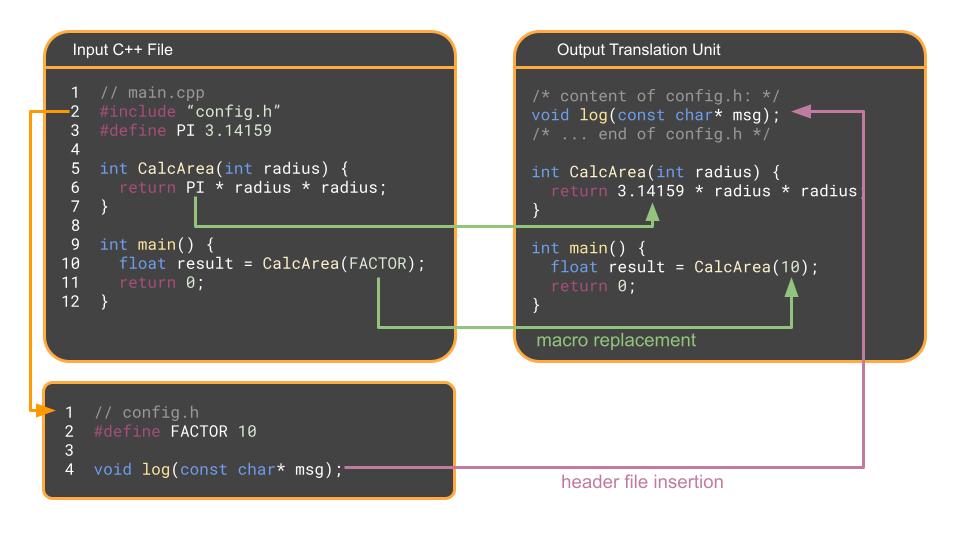
The first stage, before any compiling happens, is where the preprocessor runs over each .cpp file and specifically handles # commands. The preprocessor doesn’t actually understand C++ syntax, but is more of a glorified find and replace tool.
- It finds every
#includeand copy-pastes the contents of that header file into the.cppfile. - It finds every
#define, i.e., macro, and replaces it with the corresponding text. - It strips out all comments.
The result is a massive, single file of pure C++ code called a translation unit. For a standard codebase where your C++ file has many inputs, the translation unit can be pretty large.
The Compiler
The compiler translates the C++ code in each translation unit into raw machine code – the binary instructions that your specific CPU understands – as an object file. On Linux/Mac, these are .o files, and on Windows these are .obj files.
Object files contain:
- A header
- a code segment with the binary instructions for the functions defined in the translation unit
- a data segment with initialized static variables
- a read-only data segment with initialized static constants
- a section for uninitialized static data (e.g.,
int stuffs[1000000];) - A symbol table listing the functions and variables that this translation unit can offer to others.
- A set of unresolved references that the object file expects to exist but doesn’t have just yet – functions or global variables it needs from other object files.
- Debugging information.
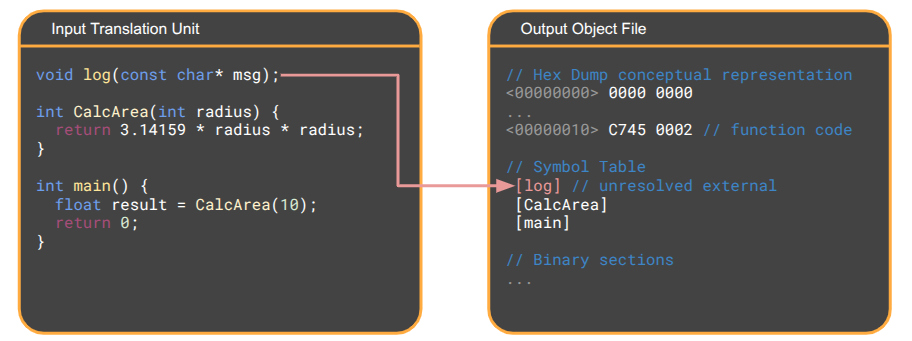
Concepts like structs only matter during the compilation phase, where they inform the compiler how much memory to allocate on the stack or what offsets to look at variables for. The resulting object files only care about memory addresses, function blocks, and global variables.
The Linker
Once all of the .cpp files have been compiled into a bunch of .obj files, the linker will handle the task of resolving references. If an object file needs a reference that the linker cannot find, it will issue the undefined reference or unresolved external symbol errors we know so well. Similarly if it finds multiple object files offering the same function signatures, it will output a multiple definitions error.
When building a executable (as opposed to a library), the linker starts by creating a new, empty file on disk (e.g., game.exe). This file has an OS-specific format, such as ELF on Linux and PE on Windows.
Next, the linker reads every .obj file and copies the machine code binary into the executable, stacking them into one large, contiguous section.
Each object file listed its unresolved symbols, along with where, in its compiled code block, the address of the symbol should be written once the symbol is finally resolved. The linker thus works through the copied binary sections and writes the appropriate jump instructions to jump to the right function calls or load the right global variable address. This process is called relocation.
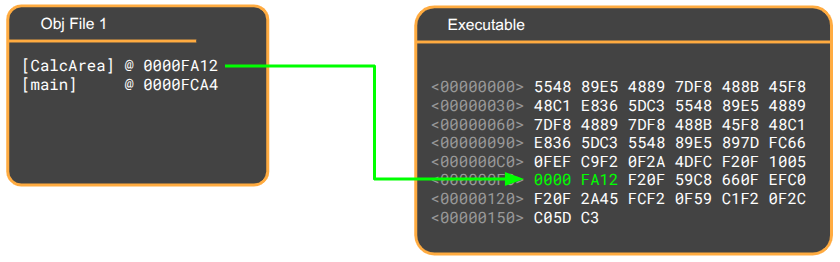
The linking step also handles any libraries that your executable depends on. Any static library (.a for ‘archive’ file on Linux, .lib on Windows) is basically a collection of object files, and is copied into your executable like the other objects. Any shared library (.so file on Linux, .dll for ‘dynamic linked library’ on Windows) is not copied, but the linker instead records a reference to it in the executable that the dynamic linker connects when your OS goes to execute your file.
Once the linker has completed relocation, it is done, and game.exe is a self-contained block of machine code (except for references to dynamic libraries). You can actually delete all of the .obj files and the executable will work just fine. The primary reason .obj files are kept around is for incremental builds.
Faster Clean Builds
Now that we have an understanding of the compilation process, we can reason about changes that will speed up compile time. The first such speedup will be for clean builds, which is a complete build that runs the entire compilation pipeline without using any cached work.
Under a typical build structure, many object files are produced and then linked:
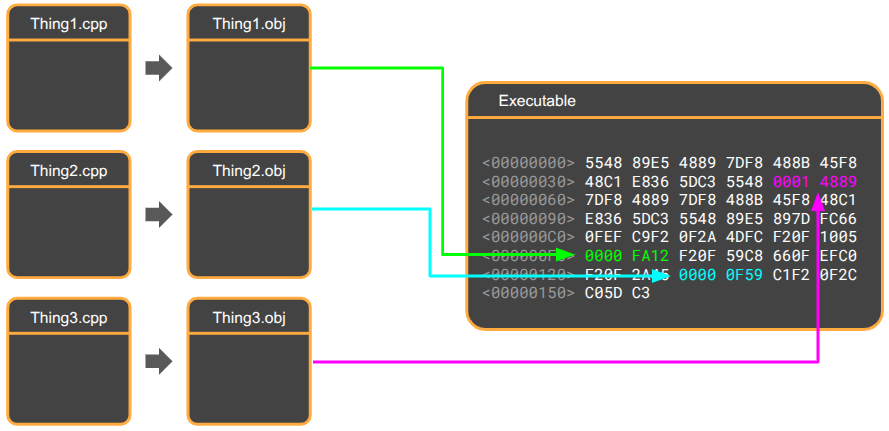
The trick here is the unity build, which collapses the project’s many object files into just one:
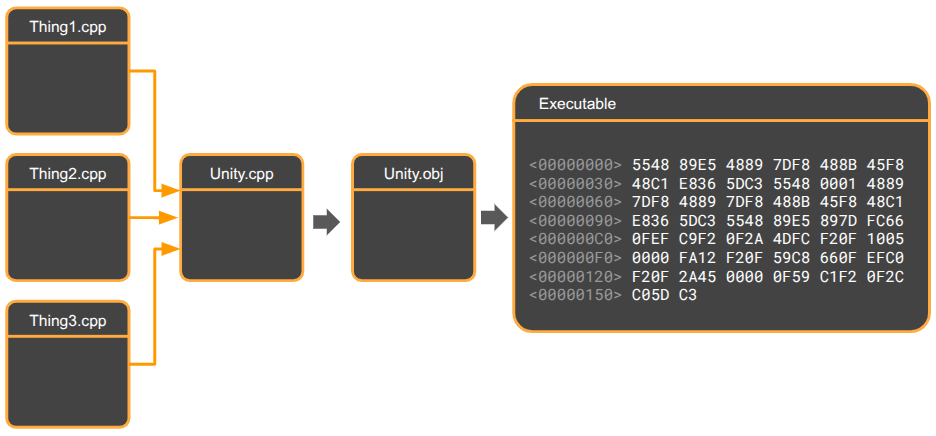
This is achieved by creating a .cpp file that includes all of the project’s other .cpp files, and then only have our Makefile build that one target.
In practice, the linker still needs to do some work. Most code bases will still link against libraries, and it is recommended to compile external dependencies that we do have the source for into separate .obj files and link against them.
Time is saved in the linking phase by not having to stitch together potentially thousands of small object files. All of the memory math is handled by the compiler, which has access to all of the definitions.
The primary time savings typically comes from eliminating redundant header parsing. In compilation, each translation unit receives copies of the headers it includes. The same header, such as <vector>, may be used in many translation units, and will be repeatedly parsed for each one. Having a single translation unit allows the #pragma once guards to do their work and ensure the preprocessor only copies each header once, so each header is only parsed once.
Unity builds also benefit from being able to do more inlining, as methods across translation units either cannot be inlined, or require link-time optimization to be enabled, which makes linking that much slower. In a unity build, everything is in one object file, so the entire program can be optimized.
The final speedup comes from reduced disk I/O. The compiler does not need to repeatedly read header files or write many object files.
Moving to a unity build dropped clean build times for ~45s to under 5s!
Faster Incremental Builds
During typical development, code is rebuilt incrementally. Here, a full build has already happened, you edit one or two .cpp files, and run make again. In an incremental build, only the .obj files for the two edited .cpp files need to be recompiled, followed by linking.
Using a unity build means changing a single .cpp file requires the compiler to do the full work of producing the one .obj file all over again. As such, large projects will tend to use standard builds for typical development and unity builds for release builds or CI/CD pipelines.
We can use another technique to speed up incremental builds. Here, we aim to reduce the time it takes to compile individual object files.
Time can be saved by reducing the work done by the preprocessor in copying header files included in other header files by using forward declarations instead.
Consider the following example, where a Weapon struct is defined in weapon.h and it is used by a Player struct in player.h:
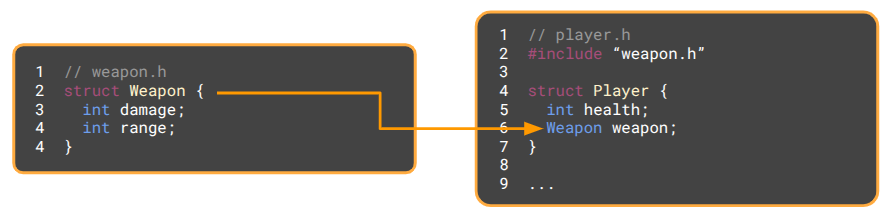
If we later change Weapon, such as by adding a new int cooldown, and go to compile, the build system will see that weapon.h has changed. The player.h file includes weapon.h, so it is marked for recompilation and any file that includes player.h is also recompiled. A simple field change has cascaded into a large number of updated object files.
As written, player.h must include weapon.h, because Player contains a Weapon, and the compiler needs to know its size. We can avoid this dependency by using a pointer instead. The compiler cares about memory layouts, and pointers are all the same size, so we can use a forward declaration to promise the compiler that Weapon exists somewhere and avoid including weapon.h:
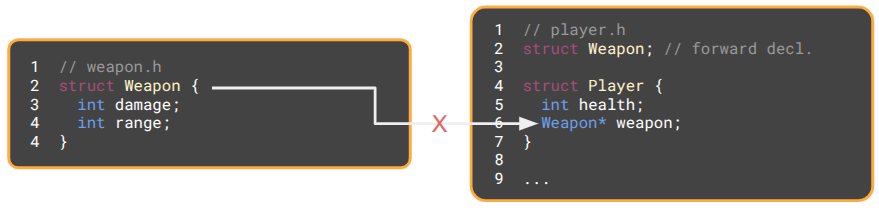
Now, if Weapon is changed, player.h is completely unaffected. Any .cpp files that merely include player.h no longer need to be recompiled.
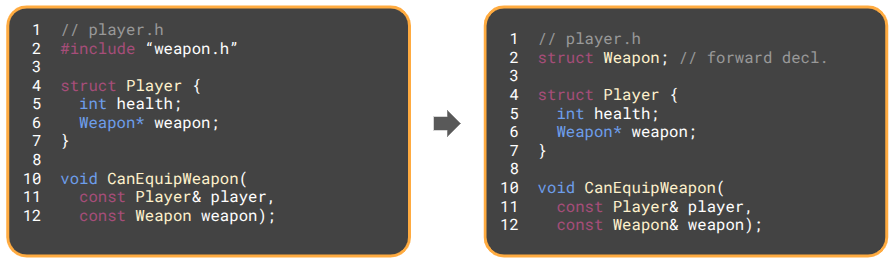
The same trick works for methods as well. Passing a struct like Weapon by value will require knowing its size. Changing to a pointer or reference (which is basically a pointer) removes that requirement, and a forward declaration is enough to promise that the type will eventually be defined.
The Best of Both Worlds
We can get the benefits of both unity builds during full recompilation and forward declarations during incremental builds by modifying our Makefile to run a default incremental build when make is involved and have a separate command, make unity, that compiles unity.cpp directly into an executable:
# ---------------------------------------------------------
# TARGET 1: The Incremental Build (Default)
# ---------------------------------------------------------
all: $(TARGET)

$(TARGET): $(OBJS)
	$(CXX) $(OBJS) -o $(TARGET) $(LDFLAGS)

%.o: %.cpp
	$(CXX) $(CFLAGS) -c $< -o $@

# ---------------------------------------------------------
# TARGET 2: The Unity Build
# ---------------------------------------------------------
# Notice this target does NOT depend on $(OBJS). It bypasses them.
unity: src/unity.cpp
	$(CXX) $(CFLAGS) src/unity.cpp -o $(TARGET) $(LDFLAGS)
This sort of a setup is not quite a panacea – you must suffer the cost of a full non-unity build in order to take advantage of incremental builds. As such, I’m personally going with all unity build, all the time for now (something Casey Muratori has espoused). Clean files seem safest.
It is worth mentioning that unity builds also prevent repeated definitions using the same function name. Any nameless namespaces or static helper functions in your .cpp files all get merged together, hence a chance for collision.
Conclusion
Overall, I found this foray into compilation time quite satisfying. Not only did this process reduce how much time I sit around waiting for code to recompile, it also forced me to better understand the whole C++ compilation process. Oftentimes, a basic understanding of the system can make a huge difference in making informed decisions and understanding what the compiler is trying to tell you when something goes wrong.